

Blog / How to Use Workflow Templates for Omnichannel Campaigns

Wick
December 26, 2025How to Use Workflow Templates for Omnichannel Campaigns
Workflow templates simplify managing multiple marketing channels like email, SMS, and social media by automating tasks and ensuring consistent messaging. For UAE businesses, where 84% of customers use multiple channels during transactions, these templates are essential to streamline operations and improve customer experience. By integrating triggers, actions, conditions, and time controls, workflow templates automate repetitive tasks, reduce errors, and align marketing efforts across platforms. This is particularly important in the UAE's diverse and fast-growing market, with e-commerce projected to reach AED 29.4 billion by 2025.
Key benefits include:
- Automation: Saves time by handling tasks like follow-ups and data updates.
- Consistency: Ensures unified messaging across channels.
- Personalisation: Adapts to customer preferences, such as language or location.
- Scalability: Supports campaigns from simple tasks to complex customer journeys.
To succeed, businesses should:
- Define clear goals using SMART objectives.
- Select templates that match their needs and integrate with existing tools.
- Customise workflows for UAE-specific requirements, like AED currency and DD/MM/YYYY dates.
- Align campaigns with local events like Ramadan or National Day.
- Regularly monitor, test, and refine workflows for better performance.
Workflow templates not only improve efficiency but also help businesses compete in the UAE’s dynamic market by delivering seamless, personalised customer experiences.
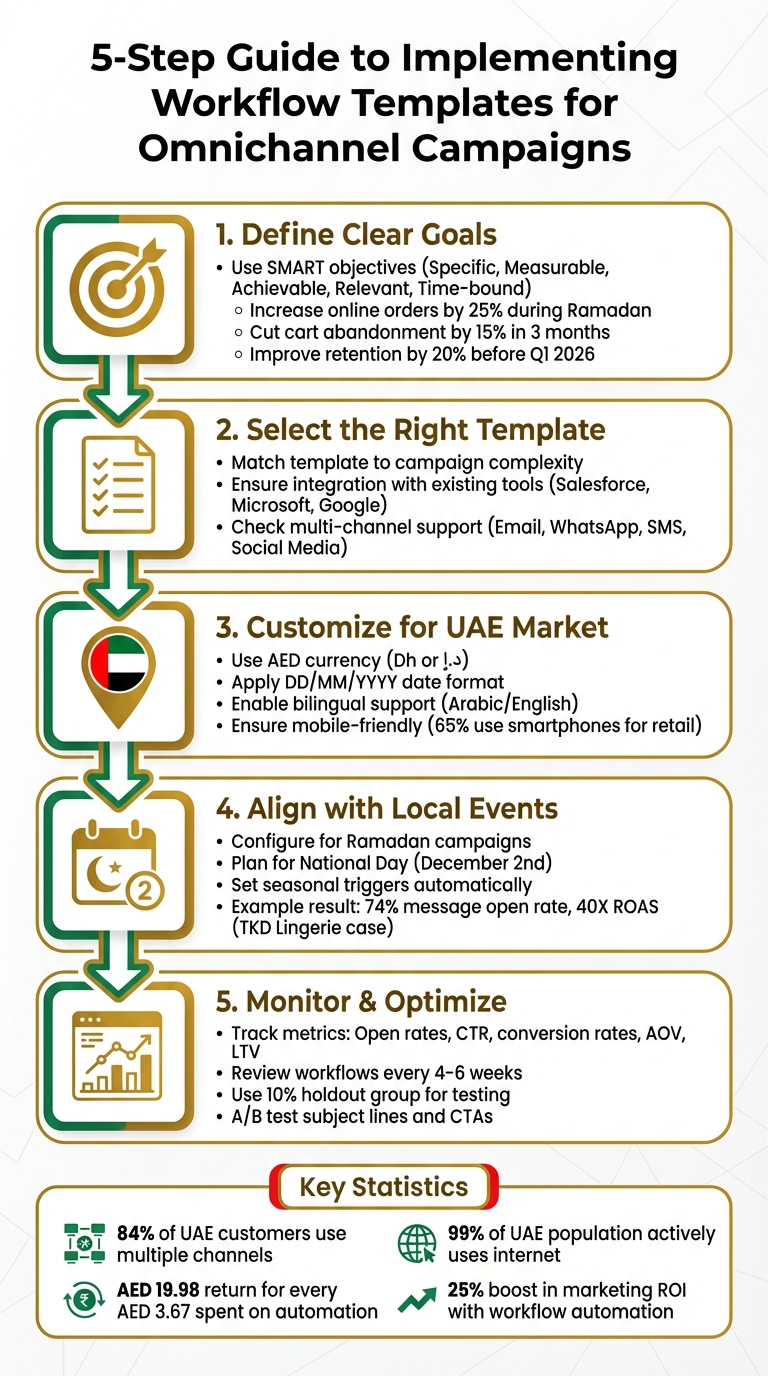
5-Step Guide to Implementing Workflow Templates for Omnichannel Campaigns in UAE
How to build an Omnichannel Marketing Experience using Marketing Automation
Selecting the Right Workflow Template
Finding the perfect workflow template comes down to aligning it with your business goals. The ideal template should streamline your processes, not complicate them.
Setting Campaign Objectives
Before diving into templates, it’s essential to define your goals clearly. Using SMART goals (Specific, Measurable, Achievable, Relevant, Time-bound) is a great starting point. For example, are you looking to increase online orders by 25% during Ramadan? Perhaps you want to cut cart abandonment by 15% within three months or improve customer retention among Dubai Marina residents by 20% before Q1 2026 wraps up?
Your objectives will dictate the complexity of the workflow you need. A simple task like sending a welcome email to new subscribers might only require a basic targeting workflow. However, managing a customer’s journey - from their first interaction to post-purchase follow-ups across email, WhatsApp, and SMS - calls for a campaign workflow with advanced tools like approval stages and flow control.
Start by reviewing your current manual processes. Map out each step and identify where delays or inefficiencies occur. This documentation helps teams refine, automate, and delegate tasks effectively. It also ensures you choose templates that solve actual problems rather than hypothetical ones.
Once your goals are clear, evaluate template features to make sure they meet your campaign needs.
Assessing Template Features
Not all templates are built the same. The right one should integrate seamlessly with your existing tools, whether you’re using Salesforce for CRM, Microsoft for communication, or Google for email. This is especially important when dealing with multilingual audiences, diverse payment methods, and various communication channels.
Check if the template supports the channels you need. Can it handle email, WhatsApp, SMS, and social media in one workflow? Does it offer advanced segmentation, such as routing contacts based on their preferred channel or behaviour? For instance, a customer in Abu Dhabi might favour WhatsApp, while someone in Sharjah might respond better to SMS. A good template should adapt to these preferences automatically.
You’ll also need to assess the complexity. Basic templates are great for automating single tasks, while orchestration templates are designed to handle entire workflows, from lead capture to order fulfilment. For UAE e-commerce businesses, orchestration templates are particularly valuable - they can coordinate payment confirmations, inventory updates, and delivery tracking across multiple systems.
Data management is another key factor. Look for templates that can clean, format, and transfer data between apps without manual input. This ensures data accuracy and saves time. For example, ActiveCampaign managed to lower its new customer churn rate to 6% by using workflow automation, while Calendly saves 10 hours of manual work weekly through its automated workflows.
By carefully assessing these features, you can select templates that align with your operational needs and campaign goals.
Wick's Plans and Template Features
Once you’ve identified the features you need, the next step is to match them with a service plan that supports your business as it grows.
Wick offers three plans tailored to different business sizes and objectives:
- Basic Plan: Ideal for small businesses starting with omnichannel strategies. This plan includes foundational tools like website development, basic SEO, content creation, and social media management. It also provides simple workflow templates for tasks such as sending welcome emails or abandoned cart reminders.
- Advanced Plan: Geared towards mid-sized businesses, this plan includes advanced SEO, paid advertising, data analytics, and customer journey mapping. The templates in this plan support multi-channel campaigns with segmentation features, making it perfect for businesses catering to diverse audiences across the UAE.
- Enterprise Plan: Designed for large-scale operations, this plan incorporates AI-driven personalisation, CDP (Customer Data Platform) implementation, and strategic consulting. The templates here are built for complex orchestration, managing entire customer lifecycles across email, WhatsApp, SMS, and social media. They also include approval workflows and advanced flow control, perfect for campaigns targeting thousands of customers with personalised variations based on location, language, or purchase history.
Each plan is priced based on the unique requirements of UAE businesses, considering factors like industry, size, and growth stage. This flexibility ensures that companies can find a solution that fits their specific needs and goals.
Adapting Workflow Templates for UAE Markets
Once you've chosen a suitable workflow template, it's important to customise it for the UAE market. This involves aligning formats with local standards and ensuring practices reflect regional expectations. By doing so, you combine technical accuracy with cultural relevance, creating a foundation for effective engagement.
Localising Templates for UAE Audiences
To meet local standards, adjust templates to use AED currency (denoted as "Dh" or "د.إ"), DD/MM/YYYY date formats, and the appropriate number conventions. In March 2025, the UAE Central Bank introduced a new currency symbol - a Latin letter "D" crossed by two horizontal lines, inspired by the UAE flag. However, this symbol may still lack standard Unicode support across various platforms.
Ensure that workflows default to the DD/MM/YYYY date format (e.g., 23/05/1989) instead of the American MM/DD/YYYY structure. This prevents data import errors and ensures campaigns are scheduled correctly. When exporting data for reports or third-party platforms, use the "Edit the extraction file format" settings to define specific column labels and enforce date and number formats before generating files.
For bilingual campaigns, consider number formatting carefully. UAE banknotes and coins display both Western Arabic numerals (0–9) and Eastern Arabic numerals (٠–٩). Adjust your data extraction settings to cater to either English or Arabic numerals based on your audience's preferences. With 99% of the UAE population actively using the internet and 65% relying on smartphones during retail journeys, templates should also be mobile-friendly, especially for platforms like WhatsApp, Instagram, and Facebook.
Aligning with Seasonal and Local Events
Customising your templates to align with local events and seasonal trends ensures your messaging resonates with UAE audiences. Pre-configure workflows to match key moments that influence consumer behaviour. For instance, Ramadan campaigns require thoughtful planning around iftar timings and shopping habits, while National Day (2nd December) offers opportunities for patriotic promotions and themed messaging.
A great example of this approach is TKD Lingerie, a UAE-based brand that ran a WhatsApp Broadcast campaign in August 2024. By tailoring promotions to customer preferences, they achieved a 74% message open rate and a 40X return on ad spend (ROAS).
"We always go the extra mile for our customers and having the ability to personalise communications is super important".
- Kate Kikano, Founder of TKD Lingerie
Incorporate seasonal triggers into your templates to automatically adjust messaging, offers, and delivery times based on the UAE calendar. This strategy keeps campaigns relevant without needing constant manual updates. It’s especially valuable in an omnichannel environment, where UAE businesses see an 80% higher rate of incremental store visits.
Maintaining Compliance and Sensitivity
Cultural and technical compliance is crucial for building trust with UAE audiences. Cultural sensitivity involves respecting local norms and regulations. For instance, avoid sending promotional messages during prayer times, ensure imagery adheres to modesty standards, and use language that aligns with Islamic values.
When setting up automated responses for abandoned carts or cancelled orders, keep the tone respectful and patient. For example, Anigma Technologies, a UAE-based retailer specialising in gaming PC components, introduced automated responses across Instagram, Facebook, and WhatsApp in 2024. By crafting culturally appropriate messages, they recovered 70% of cancelled orders and grew their customer base by 25%.
On the technical side, follow the UAE Design System guidelines to ensure your digital content is accessible, inclusive, and visually consistent with local expectations. Additionally, configure data reconciliation processes to validate column types during imports, minimising errors that could compromise customer data or violate compliance standards. With the UAE ranked 12th in the IMD World Digital Competitiveness Ranking 2023, maintaining excellent technical standards isn’t just about compliance - it’s about meeting the high expectations of UAE consumers.
Step-by-Step Guide to Implementing Workflow Templates
With your template tailored for the UAE market, it's time to set it up for live deployment. This process brings together customer data, channel integrations, and automation into a single, streamlined workflow. Here's how you can launch an omnichannel workflow using Wick's platform.
Mapping Customer Journeys
Begin by visualising how customers engage with your brand at every touchpoint. Mapping an omnichannel journey means uniting all customer interactions into a cohesive path. Typically, this journey includes five main stages: Awareness, Consideration, Conversion, Adoption/Onboarding, and Retention/Advocacy.
Wick’s visual canvas makes this easier. You can drag and drop activities like queries, splits, and deliveries to reflect real customer behaviours. A great example of this in action is Publishers Clearing House (PCH), which used MoEngage to identify high-engagement paths through A/B testing on segmented users. By applying these insights to automated workflows, they boosted daily active users by 23% and reactivated over 30,000 dormant app users, achieving an average conversion rate of 3.93%.
To make the map even more effective, incorporate emotion tracking to identify moments where customers feel frustrated or reassured. For instance, if analytics show a drop-off between consideration and conversion, tweak the workflow template to trigger automated support or special incentives at that point. Collaboration is key here - bring in teams from Sales, Marketing, Product, and Customer Support to ensure the map reflects all customer touchpoints. Treat these maps as dynamic tools, reviewing and updating them at least quarterly to adapt to new channels or market trends.
Once your map is ready, you can move on to setting up triggers and integrations.
Setting Up Templates and Integrations
After completing your journey map, import pre-configured templates for channels like Email, SMS, and Push notifications. Customise each template with your brand's elements, localised subject lines, and personalisation fields to resonate with UAE audiences. For direct mail, prepare extraction files (CSV or text) with columns for recipient names and addresses.
Next, configure triggers - such as form submissions or purchases - and conditions, like segment, country, or consent, to guide how contacts progress through the workflow. Make sure to integrate consent checks, such as GDPR or CCPA opt-ins, into these triggers to ensure compliance before sending automated messages. To avoid overwhelming your audience, set frequency caps to limit communications to 1–3 emails per week per segment. This helps reduce unsubscribe rates and audience fatigue.
Consider the success of 1Weather, a mobile weather app with 8 million active users. By using MoEngage to segment users based on location and activity, they sent hyper-local alerts in real time. This approach resulted in 25 million additional app opens, tripled mobile app engagement, and a 10% increase in push notification click-through rates.
"With all of the automations that we're using, the store runs by itself. I'm able to focus on other projects." - Mike Morrow, Founder, Morrow Audio
With templates and triggers in place, the next step is to test and launch your campaign.
Launching and Monitoring Campaigns
Before going live, thoroughly QA test your content, personalisation, and how it renders across devices. Use "Enable but do not execute" modes to validate the workflow logic without triggering live messages. Test scoring rules and progression logic in lead nurture workflows to ensure recipients move through the journey as intended.
Once testing is complete, launch the workflow and utilise Wick's analytics dashboards to monitor delivery statuses, execution progress, and technical logs. This monitoring phase ensures your workflows are running as expected. Pay close attention to key performance indicators like open rates, click-through rates, and conversion paths. These metrics can help you identify underperforming segments early on. Use tools like workflow "HeatMaps" to pinpoint bottlenecks and "Audit Trails" to track all changes and executions.
Keep 10% of your audience as a control group to measure the effectiveness of your workflow accurately. Set personalised alerts to notify operators of errors or sudden performance changes, and monitor logs to maintain a strong sender reputation.
For example, Poshmark’s use of flow versioning led to a noticeable improvement in their conversion metrics.
Improving and Scaling Workflow Templates
Once your workflows are live, the key to success lies in constant refinement. Keep an eye on metrics like conversion rates, average order value (AOV), and lifetime value (LTV). Segmenting users by emirate or delivery zone can uncover hyperlocal trends that drive performance. For example, case studies have shown that splitting contacts based on Recency, Frequency, and Monetary (RFM) metrics or lifecycle stages can lead to 3×–4× improvements in conversion rates.
Tracking Performance and Analytics
To truly understand your workflow's impact, track a mix of metrics across four key areas:
- Engagement: Monitor open rates and click-through rates.
- Conversion: Focus on conversion rates and AOV.
- Retention: Keep an eye on churn rates and repeat purchases.
- Operational Metrics: Include delivery throughput and error logs in your analysis.
Go beyond basic metrics by tracking revenue-per-recipient. This financial lens helps measure the direct impact of workflow changes. Companies that leverage advanced cross-channel attribution often see 15%–20% more efficient marketing budgets. Regularly evaluate your audience segments to ensure they align with your business goals, and assign segment codes to outbound campaigns to track the success of specific pathways.
"Our open rates jumped 2X after segmentation. We're finally speaking to the right customers." - Noura E
These analytics provide the foundation for systematic improvements through controlled testing.
Refining Templates Through Testing
Testing is your best friend when it comes to optimisation. Use a 10% holdout group to measure the true impact of your workflows and calculate ROI. A/B testing works well for smaller tweaks, like subject lines or calls-to-action, but holdout groups are essential for evaluating the effectiveness of the entire customer journey.
Review workflows every 4–6 weeks, or right after major campaigns, to make data-driven adjustments. Space interactions 24–48 hours apart, and always confirm consent flags before proceeding. Before a full rollout, try a soft launch with 5–10% of your audience to collect early performance data while minimising risk.
Once your workflows are fine-tuned, these methods can be scaled to maximise your campaign's reach.
Expanding Workflows Across Campaigns
Scaling workflows involves moving from simple task automation to full orchestration. Use refined metrics and templates to duplicate workflows rather than manually copying them - this avoids potential configuration errors. Set up guardrail conditions to ensure actions trigger only when specific criteria are met.
Background workflows, like database maintenance and data forwarding, can also help support your growing infrastructure. To maintain personalisation across UAE audiences, segment users by their preferred communication channels, whether SMS, email, or direct mail. Studies show automation can boost conversion rates by 56%, while multichannel interactions can increase customer spending by 9%.
Conclusion
Workflow templates simplify the complexity of modern campaigns by transforming them into efficient, automated systems. By taking over repetitive tasks like data entry and list uploads, they free up your team to focus on strategic planning and creative execution instead of getting bogged down in manual processes. The impact is impressive - on average, companies see a return of AED 19.98 for every AED 3.67 spent on marketing automation over three years. Additionally, businesses typically report a 25% boost in marketing ROI after adopting these systems.
Another key advantage is the ability to deliver consistent messaging across all channels. Whether your customers interact with your brand via email, SMS, or WhatsApp, they receive timely and relevant messages. This consistency is especially important in the UAE, where 99% of the population actively engages with social media and online platforms. Workflow templates also allow businesses to scale from simple email campaigns to sophisticated cross-channel strategies without requiring a proportional increase in resources or budget.
These benefits are grounded in Wick’s Four Pillar Framework. The Visibility pillar ensures you can track customer interactions across devices and channels, while Measurement captures the impact of every touchpoint - a crucial feature, considering that 82% of marketers struggle with achieving cross-channel success. Personalisation uses integrated data to create tailored experiences, and Optimisation helps refine strategies and budgets based on detailed campaign insights. Together, these pillars form the foundation of a unified digital ecosystem, which is essential for businesses in the UAE’s dynamic market.
As detailed in the implementation guide, each workflow template is a stepping stone toward building this cohesive ecosystem. Start with impactful templates like welcome sequences or abandoned cart recovery. Set up safeguards to avoid overwhelming your audience with too many messages, and review performance every 4–6 weeks to adapt to changing customer behaviours. With the right templates and framework in place, your omnichannel campaigns can become a powerful engine for growth - strengthening customer relationships and driving revenue automatically. Embrace workflow templates today to create an integrated, automated strategy that delivers measurable results.
FAQs
How do workflow templates improve customer experiences in the UAE?
Workflow templates play a key role in improving customer experiences across the UAE. They empower businesses to deliver interactions that are not only timely and personalised but also culturally relevant. By pulling data from multiple sources - like WhatsApp, website activity, and CRM systems - these templates create a comprehensive view of each customer. This enables businesses to send messages tailored to individual needs and delivered at just the right time, boosting both engagement and trust.
What makes these templates particularly effective in the UAE is their ability to incorporate local elements. For example, campaigns can be aligned with significant events like Ramadan or UAE National Day, and language preferences (Arabic or English) can be seamlessly accommodated. They also simplify omnichannel marketing by automating tasks across various platforms, including email, SMS, social media, and even in-store interactions. The result? A smooth and consistent brand experience for customers.
Moreover, workflow templates come equipped with analytics designed for the UAE market. Businesses can track campaign performance in AED, making it easier to measure success and fine-tune strategies. This leads to improved ROI, stronger customer loyalty, and higher satisfaction levels.
What features should a workflow template have for effective omnichannel campaigns?
When choosing a workflow template for omnichannel campaigns, it’s essential to find one that lets you manage multiple channels effortlessly within a single, customisable setup. The ideal template should allow you to configure every step - like audience segmentation, email or SMS delivery, and data-driven decision-making - without requiring any coding skills.
Here are some key features to look for:
- Flexible activity blocks: These should support various channels like email, SMS, WhatsApp, and social media, making it easy to adjust the workflow to suit your campaign’s needs.
- Data management tools: Precise audience targeting, segmentation, and filtering tools help ensure your messages reach the right people at the right time.
- Automation controls: Features like triggers, loops, and wait timers enable you to schedule follow-ups based on customer actions, such as cart abandonment or browsing behaviour.
- Performance tracking: Built-in analytics to monitor metrics like open rates, conversions, and revenue, so you can fine-tune your campaigns for better results.
For campaigns targeting audiences in the UAE, ensure the template supports localisation. This includes displaying prices in AED, using the dd/MM/yyyy date format, and offering bilingual content in Arabic and English. Additionally, scheduling campaigns around significant regional events like Ramadan can significantly boost engagement. By focusing on these capabilities, you’ll be well-equipped to design impactful, personalised omnichannel campaigns tailored to your audience.
How can workflow templates be tailored for the UAE's cultural and technical requirements?
To ensure workflow templates resonate with the UAE's cultural norms and meet technical requirements, careful localisation is essential. Start by including bilingual content in Arabic and English, and implement language-detection rules to automatically deliver the appropriate version. Respect major cultural events like Ramadan, Eid Al-Fitr, Eid Al-Adha, and UAE National Day by scheduling communications around these dates and avoiding messages during fasting hours (from sunrise to sunset). Additionally, use the DD/MM/YYYY date format and the 24-hour clock (e.g., 14:30) for time. Prices should be displayed in AED with proper formatting (e.g., AED 1,250.00).
On the technical side, ensure workflows comply with UAE data-protection laws. This includes anonymising personal data, encrypting sensitive information, and maintaining clear consent records. Add validation steps to check for potential issues, such as ensuring Arabic field lengths are correct or verifying AED price accuracy. By blending cultural awareness with strong technical safeguards, you can deliver smooth and effective omnichannel campaigns tailored for UAE audiences.