

Blog / How JavaScript Impacts Website Crawlability
How JavaScript Impacts Website Crawlability
JavaScript makes websites dynamic and interactive, but it can complicate how search engines like Google access and index your content. If your site relies heavily on JavaScript, key elements like product prices (e.g., AED), navigation, or meta tags might not be visible to search engines or social media bots. This can delay indexing, hurt search rankings, and negatively impact user experience.
To avoid these issues, focus on:
- Server-Side Rendering (SSR) or Static Site Generation (SSG): Ensures critical content is visible in the initial HTML.
- Minify and Defer JavaScript: Speeds up loading and reduces crawler workload.
- Test Regularly: Use tools like Google Search Console to ensure Googlebot can see all key content.
For UAE businesses, timely indexing is crucial, especially for localized content like AED pricing or Arabic pages. Follow these steps to make sure your site remains accessible and competitive.
How Google Search indexes JavaScript sites - JavaScript SEO
How Search Engines Process JavaScript
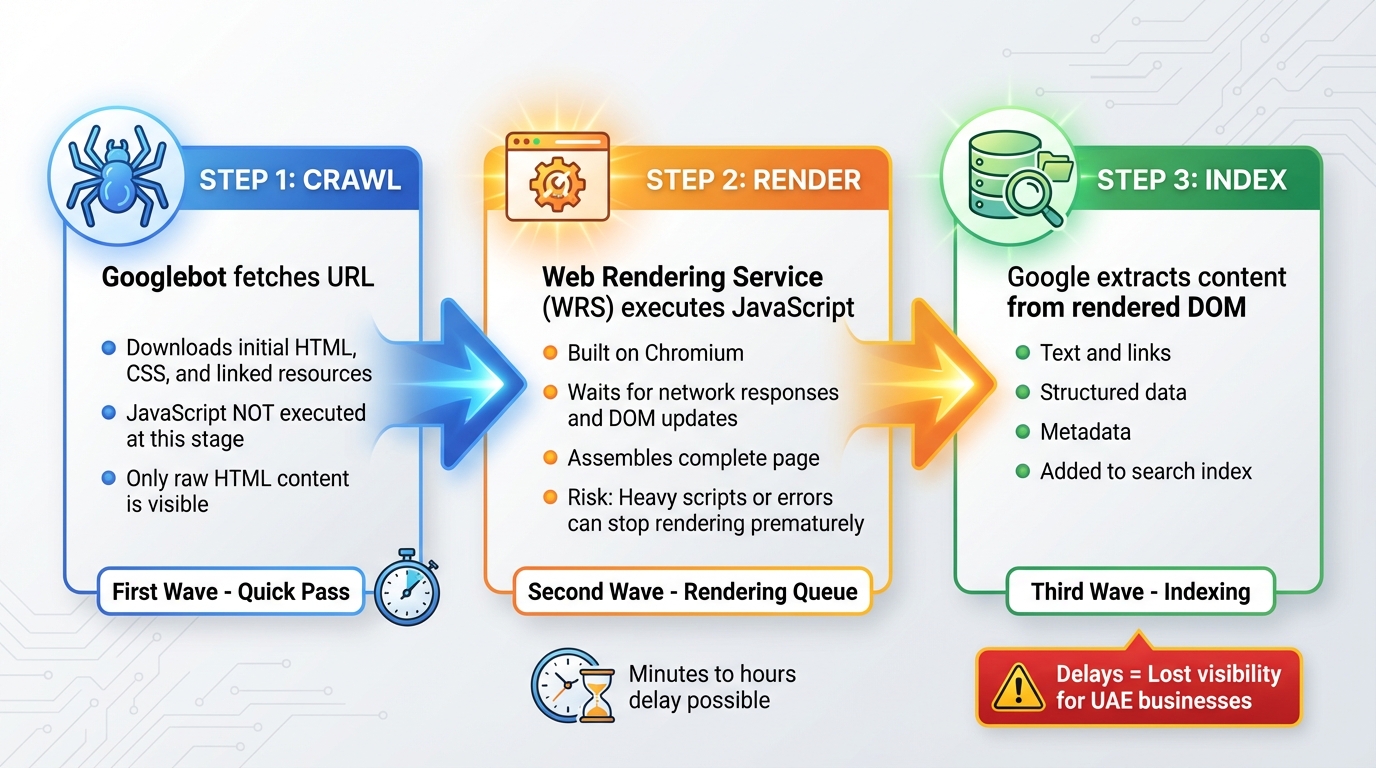
How Google Processes JavaScript: 3-Step Crawl, Render, and Index Process
Google handles JavaScript pages through a three-step process: crawl, render, and index. Here's how it works:
First, Googlebot fetches the URL and downloads the initial HTML, CSS, and linked resources. At this stage, JavaScript isn't executed, so only the content embedded in the raw HTML is visible. This creates challenges for pages heavily reliant on JavaScript.
Next comes the rendering phase. Google's Web Rendering Service (WRS), built on Chromium, executes JavaScript, waits for network responses and DOM updates, and then assembles the complete page. However, this process is time- and resource-sensitive. If scripts are too heavy or contain errors, rendering might stop prematurely, leaving parts of the page either partially or entirely unindexed.
Finally, during the indexing phase, Google extracts text, links, structured data, and metadata from the rendered DOM to add to its search index. For businesses in the UAE, where timing can be crucial for campaigns, delays in this pipeline could mean missing out on valuable search visibility.
The Two-Phase Crawling Process
Googlebot crawls in two waves, each with its own timing and resource considerations.
- First Wave: This is a quick pass where Googlebot grabs the raw HTML and any immediately visible content and links. JavaScript isn't executed here, but this allows for rapid discovery and basic indexing of pages that primarily rely on HTML.
- Second Wave: URLs are added to a rendering queue, where Google executes JavaScript to load dynamic elements like product listings or interactive features. The page is then reprocessed for indexing. While most pages are rendered within minutes, delays can still occur - ranging from hours to longer - if resources are stretched. In competitive UAE markets, these delays can be critical, especially if important content only appears after rendering.
Client-Side vs. Server-Side Rendering
How your pages are rendered plays a big role in how easily Google can crawl and index them.
With client-side rendering (CSR), the server sends a bare HTML shell, leaving the browser (or Google's WRS) to execute JavaScript, fetch data, and build the full page. This means crawlers initially see very little content, relying on the rendering phase to access the rest. If JavaScript is slow or fails, indexing may be incomplete.
In contrast, server-side rendering (SSR) generates most or all critical content on the server. The fully rendered HTML is sent in the initial response, making it easier for Googlebot to immediately crawl and index the content. JavaScript then adds interactivity. For time-sensitive pages like pricing or service descriptions in the UAE, SSR can provide faster and more dependable results.
| Aspect | Client-Side Rendering (CSR) | Server-Side Rendering (SSR) |
|---|---|---|
| Crawl Process | Initial HTML is minimal; additional content relies on JavaScript | Fully rendered HTML is sent upfront, enabling immediate indexing |
| Page Load | Faster initial load, but key content appears only after JavaScript execution | Slightly slower first-byte time, but all content is available immediately |
| SEO Impact | Risk of incomplete indexing if JavaScript is slow or fails | More dependable indexing with all critical content visible upfront |
It's worth noting that many non-Google crawlers, like social media bots used for link previews, can't execute JavaScript. This means metadata added via JavaScript - like Open Graph tags - might not be picked up. Using SSR or serving core content as static HTML ensures that essential information is accessible to these crawlers and bots across platforms.
Challenges of JavaScript for Website Crawlability
For businesses in the UAE, ensuring timely indexing is vital, especially in a competitive market where localised content - like AED pricing and Arabic pages - needs to be visible as quickly as possible. However, websites that rely heavily on JavaScript often face hurdles that can negatively affect their search performance, making it harder to achieve that essential visibility.
Delayed or Incomplete Indexing
JavaScript-heavy sites can encounter issues like errors or timeouts that prevent key elements - such as product listings, internal links, or dynamic features like infinite scroll or customer reviews - from being properly rendered. Metadata added through JavaScript, including title tags, meta descriptions, and hreflang annotations, may also be skipped by crawlers that don’t process JavaScript effectively. This can result in weak search snippets or broken link previews, which directly impacts how users perceive your site in search results.
Increased Crawl Budget Usage
Unoptimised or large JavaScript files require more bandwidth and processing power, which slows down how efficiently search engine bots can crawl and render your site. As a result, fewer pages may be crawled in a single session. For larger websites, like e-commerce platforms with thousands of product pages displaying AED prices, this can lead to outdated inventory, incorrect pricing, or expired promotions lingering in search results. This not only affects visibility but also creates a poor user experience for potential customers.
Effects on Site Speed and User Experience
Heavy or poorly optimised JavaScript can significantly slow down important performance metrics like First Contentful Paint (FCP) and Largest Contentful Paint (LCP) - both crucial for user satisfaction and search rankings. When scripts cause delays, users may experience freezing filters or slow updates to AED prices after selecting options, leading to frustration. These delays often result in higher bounce rates and lower engagement, signals that search engines might interpret as reduced page relevance.
On mobile devices, which are widely used across the UAE, excessive JavaScript can further strain resources by draining battery life and consuming more data. Over time, these technical issues, combined with a poor user experience, can harm your rankings and make it harder to compete in the digital landscape.
sbb-itb-058f46d
Optimising JavaScript for Better Crawlability
Improving JavaScript crawlability is a key step in ensuring search engines can efficiently access and index your content. By addressing the challenges outlined earlier, you can use modern techniques to make your site more crawler-friendly without delays.
Use SSR or SSG
Server-Side Rendering (SSR) creates fully formed HTML on the server before delivering it to the browser. This means crawlers can access complete content immediately without needing to process JavaScript. It's especially useful for dynamic elements like product availability, AED pricing that fluctuates, or tailored offers. For example, an e-commerce site with region-specific inventory can use SSR to ensure crawlers see accurate, up-to-date content right away.
Static Site Generation (SSG), on the other hand, builds HTML files during deployment, making them instantly available for users and crawlers. This method works best for static pages like service descriptions or blogs. Frameworks such as Next.js for React, Nuxt for Vue, and Angular Universal simplify the implementation of SSR and SSG. Many of these tools even allow you to combine both methods, applying the right approach to different types of pages based on their purpose.
Make sure key content is included in the server-rendered HTML. This ensures that even crawlers with limited JavaScript capabilities or rendering budgets can index your most important information without any issues.
Minifying and Deferring JavaScript
Minification reduces the size of JavaScript files by removing unnecessary characters like spaces, comments, and line breaks. Smaller file sizes mean faster load times, allowing crawlers to spend more resources on rendering your content instead of processing code. Tools like Terser or Webpack plugins can automate this process during your build.
For non-essential scripts - like chat widgets, analytics, or pop-ups - use the defer or async attributes to load them after the primary content. This ensures that critical elements such as navigation, service details, and AED pricing load first. For UAE-based websites, prioritising key information like contact details and service descriptions ensures both users and crawlers access the most important content without delay. Regular testing helps confirm these adjustments don’t compromise accessibility.
Regular Testing and Debugging
Testing is essential whenever you introduce new features. Whether you're adding a booking tool, currency selector, or updated product filters, verify that crawlers can still access your content. Use Google Search Console's URL Inspection tool to compare the raw HTML and rendered versions Googlebot sees. This helps you identify whether key elements, like AED prices or product lists, are visible in both formats or only after rendering.
The Mobile-Friendly Test is another valuable tool, especially since mobile browsing dominates in the UAE. If critical elements like navigation or prices fail to load in the test's rendered screenshot, mobile crawlers are likely encountering the same problems. You can also disable JavaScript in developer tools to confirm that essential content appears in the raw HTML, ensuring it’s accessible to all crawlers.
Auditing JavaScript Crawlability: Key Tools and Steps
Once you've optimised your JavaScript for crawlability, conducting regular audits is crucial to ensure everything functions as expected. Focus on auditing key JavaScript-heavy pages - like product listings, search results, and service pages - and rank them by their impact on traffic and revenue. Before making any changes, establish a baseline using Google Search Console. These audits build on earlier optimisation efforts, helping confirm that all critical content is properly crawlable.
Start by comparing how crawlers view your site with JavaScript enabled versus disabled. Use SEO auditing tools to run parallel crawls - one with JavaScript rendering turned off and another with it on. Look for differences in URLs, word count, or metadata. Discrepancies suggest that some content, such as navigation menus, AED pricing, or product details, may only appear after JavaScript executes, which could indicate crawlability issues. Comparing raw HTML to the rendered DOM can further confirm whether essential content is accessible.
Using Google Search Console and URL Inspection Tool

Google Search Console is a great place to start when diagnosing JavaScript crawlability problems. Its URL Inspection tool lets you see how Googlebot processes your pages. Simply enter a URL and select "Test live URL" to view Google's rendering. Check the Rendered HTML tab to ensure that critical elements - such as main content, internal links, canonical tags, and structured data - are visible after rendering. Additionally, review the Page Availability and Resources sections for issues like blocked JavaScript files, long load times, or rendering errors. If AED prices or product availability only appear in the rendered version but not in the raw HTML, it could lead to indexing delays.
The Page Indexing report can also help pinpoint patterns like "Crawled – currently not indexed" or "Discovered – currently not indexed." These often indicate that JavaScript-rendered content isn't being fully processed. Another key check is comparing the user-declared canonical with Google's selected canonical in the URL Inspection tool. This can reveal problems where JavaScript overwrites canonical or meta tags after the initial crawl. For UAE-specific sites, make sure that currency symbols (AED), date formats (e.g., 17/12/2025), and language-specific content are consistently present in the rendered HTML.
Testing Frameworks Like React or Angular

If your site uses frameworks like React, Angular, or Vue, additional checks are necessary. Use Chrome DevTools to disable JavaScript and reload the page. Confirm that essential elements - like headings, navigation, and pricing - appear in the raw HTML before JavaScript executes. If all you see is an empty root <div> or loading placeholders, it means the site relies too much on client-side rendering. Watch for errors or warnings in the browser console during page load, as these could indicate issues that affect what crawlers and users see.
Ensure your framework uses proper <a href="..."> elements for internal links instead of relying solely on JavaScript-driven navigation, making it easier for crawlers to follow links. If you're using Server-Side Rendering (SSR) or Static Site Generation (SSG) with tools like Next.js or Nuxt, verify that critical SEO elements - titles, meta descriptions, canonical tags, and structured data - are included in the initial HTML. You can do this by fetching the page with cURL or viewing the page source. For API-fed content, pre-render essential SEO components to ensure crawlers can access them immediately.
Incorporating these audit practices into your workflow ensures that your site performs well for both users and search engines, solidifying its online presence.
Conclusion
JavaScript can be a game-changer for SEO - when used correctly. It allows for dynamic content, faster interactions, and an engaging user experience. But when poorly implemented, it can backfire, hiding key content, slowing down page loads, and making it harder for search engines to crawl and index your site. The key takeaway? Treat JavaScript as a tool that requires careful planning and optimisation to ensure your site remains discoverable and performs well.
One of the biggest challenges lies in the two-phase crawling process, which can delay or even prevent indexing of JavaScript-generated content. For example, if critical elements like product prices in AED, internal links, or metadata only appear after client-side rendering, some crawlers may never access them. Additionally, heavy, unminified JavaScript can slow load times, waste crawl budgets, and negatively affect Core Web Vitals - ultimately hurting your rankings and conversions. For businesses in the UAE investing in paid media, poor crawlability means you may end up spending more to make up for lost organic traffic.
To address these issues, focus on choosing the right rendering approach for your key pages. Server-side rendering (SSR) or static site generation (SSG) ensures that essential content is present in the initial HTML. Combine this with performance best practices, such as minifying JavaScript, deferring non-critical scripts, and using progressive enhancement to ensure core content remains accessible even if JavaScript fails. Regular testing with tools like Google Search Console’s URL Inspection and JavaScript-capable crawlers can confirm what search engines actually see. Since code updates, framework changes, and new scripts can unexpectedly affect crawlability, ongoing monitoring and technical audits are crucial.
For UAE businesses managing multilingual websites, omnichannel retail platforms, or time-sensitive campaigns like property launches, delayed indexing can directly impact revenue. Acting quickly to resolve these issues is critical. A consultancy like Wick can help. Their Four Pillar Framework aligns site architecture and content with SEO best practices while integrating analytics and automation to catch problems early. This approach ensures that enhancements to user experience or personalisation don’t inadvertently harm how search engines perceive your site, creating a well-optimised, crawlable digital environment that supports sustainable growth.
The bottom line? Regular audits and prompt action on crawlability issues are non-negotiable. Use the testing methods outlined earlier to ensure critical pages are accessible to search engines. If you find gaps - or want to incorporate JavaScript optimisation into a broader SEO strategy - consider seeking expert help to conduct a detailed crawlability audit and strengthen your site’s long-term performance.
FAQs
What impact does JavaScript have on SEO and search engine rankings?
When it comes to SEO, JavaScript can play a big role in how your site performs in search rankings. However, if not handled carefully, it can cause issues. One of the main challenges is that search engines might struggle to crawl and index content that’s loaded dynamically through JavaScript.
To keep your site search-engine-friendly, you can use techniques like server-side rendering or dynamic rendering. These methods allow search engines to better access and understand your content, making it easier to crawl and potentially giving your rankings a boost.
By fine-tuning how JavaScript is implemented, you can strike a balance between creating a dynamic, user-focused experience and ensuring your site remains accessible to search engines.
What’s the difference between client-side and server-side rendering in web development?
Client-side rendering (CSR) handles content processing and display directly in the browser using JavaScript, typically after the page has initially loaded. This approach enables highly dynamic and interactive web experiences. However, it can slow down how quickly content becomes visible to search engines, which might affect your site's SEO performance.
Server-side rendering (SSR), in contrast, delivers fully-rendered HTML pages straight from the server to the browser. This results in faster page load times and ensures that content is immediately available for search engines to crawl, enhancing both discoverability and user experience. Each method offers its own benefits, and the choice between the two should align with your website's specific objectives and technical needs.
Why is it important for UAE businesses to have their website content indexed quickly?
Timely indexing plays a crucial role for businesses in the UAE, ensuring their website content is swiftly recognised by search engines. This not only boosts online visibility but also helps draw in more visitors and connect with potential customers more efficiently.
In the UAE's fast-moving and competitive market, responding quickly to trends and shifting customer preferences is key. Rapid indexing empowers businesses to stay responsive, meet market demands, and uphold a robust digital presence, paving the way for sustained growth.