
Blog / 5 Steps to Integrate Journey Analytics with CRM
5 Steps to Integrate Journey Analytics with CRM
Integrating journey analytics with your CRM can transform how your business understands and serves its customers. By combining CRM's transactional data ("who" and "what") with journey analytics' behavioural insights ("why"), you gain a unified view of your customers, enabling better decisions and personalised experiences. Here's how UAE businesses can get started:
- Prepare Your Data: Audit and clean all data sources (CRM, e-commerce, support systems) to ensure compatibility. Sync key fields like customer IDs, purchase history, and engagement metrics.
- Identify Touchpoints: Map customer interactions across digital (website, social media) and offline (in-store, call centres) channels. Focus on critical moments that drive conversions.
- Plan Data Flow: Define how data moves between systems, ensuring real-time syncing and schema alignment to avoid duplicates or mismatches.
- Link Data Sets: Use unique identifiers (e.g., CRM IDs or email addresses) to unify customer records across platforms.
- Analyse and Automate: Validate integration, use dashboards for actionable insights, and set up automated workflows for timely, personalised customer engagement.
For UAE businesses, this integration is especially relevant for understanding hybrid behaviours like ROPO (Research Online, Purchase Offline). Case studies reveal results like a 30% boost in customer retention and up to 300% increases in conversions when journey analytics is effectively integrated with CRM. By following these steps, you can reduce data silos, optimise marketing spend, and deliver tailored experiences that resonate with your audience.
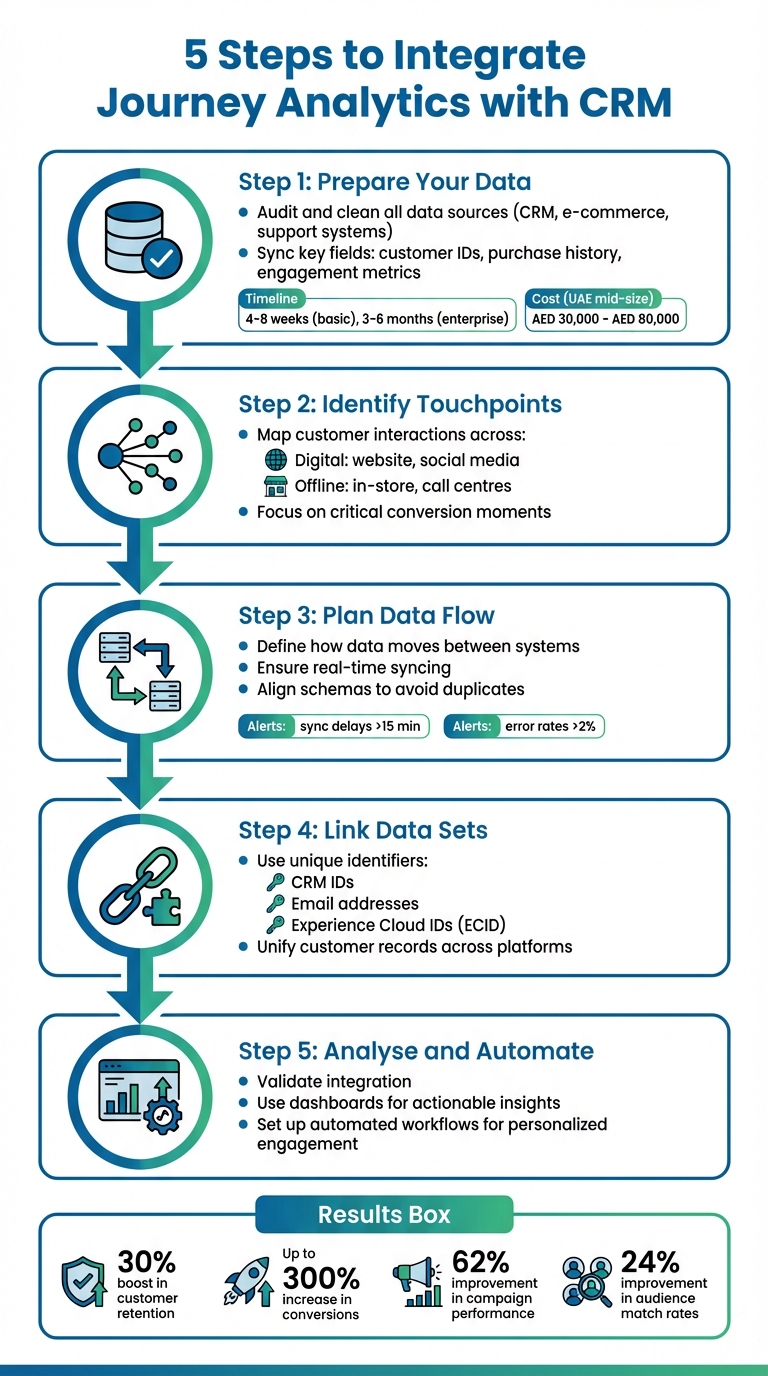
5 Steps to Integrate Journey Analytics with CRM System
CRM Analytics Data Integration Basics - Salesforce Trailhead
sbb-itb-058f46d
Preparation: Check Data Requirements and Compatibility
When dealing with disconnected systems, preparing your data thoroughly is the cornerstone of creating a unified customer view. Skipping proper audits and compatibility checks can lead to integration delays and unexpected hurdles.
Start by cataloguing all your customer data sources - CRM, marketing automation tools, e-commerce platforms, support systems, and analytics tools. Identify and list key fields like customer names, email addresses, purchase history, and consent flags. This inventory serves as your "integration roadmap", helping you plan and execute the process efficiently.
While basic CRM integrations might take 4–8 weeks, more complex enterprise-level projects can stretch to 3–6 months. However, investing time in data preparation can significantly speed up the process. For example, thorough data clean-up has been shown to improve audience match rates by 24% and reduce trigger latency to under one minute.
Define Key Data Fields for Integration
To avoid chaos as your data systems grow, focus on syncing four core data entities: Contacts, Accounts, Opportunities, and Activities. These form the backbone of your canonical data model.
Start with identity fields, which are critical for matching records across systems. A persistent identifier - such as a CRM Person ID, email address, or UUID - is essential. Without it, you risk creating duplicate records and losing track of your customers. For B2B contexts, include firmographic details like account name, industry, revenue, and territory.
For tracking engagement, capture data such as UTM parameters, page views, email clicks, and form submissions. Sales pipeline fields - like opportunity stage, deal value, and close date - are vital for measuring attribution and ROI. Don’t forget compliance fields, including consent status, regional data, and timestamps for updates.
| Data Category | Key Fields to Prioritise | Purpose |
|---|---|---|
| Identity | CRM ID, Email, Persistent UUID | Cross-system record matching |
| Firmographics | Account Name, Industry, Revenue | Sales and account-based targeting |
| Engagement | UTM Source/Medium, Page Views | Journey stage tracking |
| Sales Pipeline | Opportunity Stage, Deal Value | Attribution and ROI analysis |
| Compliance | Consent Status, GDPR/CCPA Flags | Privacy and legal adherence |
Before integration, take time to deduplicate records, standardise phone numbers to the E.164 format, structure addresses correctly, and convert timestamps to UTC.
"Poor mapping cascades problems across your entire unified system. Solid practices prevent missing information, misplaced data, and validation failures." - Jim Kutz
Check CRM and Journey Analytics Tool Compatibility
Once your data fields are defined, confirm that your CRM and analytics tools can support these requirements. Start by verifying API compatibility (REST or SOAP) and whether the systems allow real-time or batch syncs. Some older systems have rigid schemas, making it harder to add custom fields or new data types required by journey analytics tools.
Ensure both systems support secure OAuth2 authentication and have compatible data schemas. Create a mapping template to align source fields with target schemas. Set alerts for sync issues, such as latency exceeding 15 minutes or error rates climbing above 2%.
For businesses in the UAE, initial journey mapping and CRM data cleanup projects generally take 4–6 weeks to scope and implement. Mid-size companies should budget AED 30,000 to AED 80,000, which covers scoping, data cleanup, initial integration, licences, and training. This investment is worthwhile - 72% of businesses plan to upgrade to unified analytics platforms by 2026 to better capture integrated online and offline behaviour.
Before going live, always validate your setup in a sandbox environment that mirrors your production system. Use a small subset of data, including anomalies like duplicates, missing fields, and unusual formats, to test your transformation rules. Run your CRM reporting alongside the new journey analytics tool to benchmark results and ensure consistency. This parallel testing phase often reveals issues that planning alone might miss.
This preparation phase ensures your integration is smooth, enabling your unified data to power both advanced analytics and improved CRM functionality.
Step 1: Identify Data Sources and Customer Touchpoints
Once you've prepared your data and ensured compatibility, the next step is identifying all the key moments where customers interact with your brand. These interactions, often referred to as "digital breadcrumbs", include website visits, social media activity, email engagements, and support calls.
To make sense of these interactions, group them into different stages of the customer journey: Awareness (e.g., social media posts, search engine results, paid ads), Consideration (e.g., product pages, blog posts, whitepaper downloads), Decision (e.g., pricing page views, demo requests, trial signups), Post-Purchase (e.g., onboarding emails, product logins, support tickets), and Loyalty (e.g., NPS surveys, referral links, community forums). Each stage corresponds to specific CRM fields that help track customer progress through the funnel. This structured approach ensures your data remains organised and actionable.
Map the Customer Journey
Understanding the customer journey is about pinpointing the interactions that truly drive results. Instead of tracking every single action, focus on "key decision moments" - those critical interactions that lead to conversions, such as demo requests or pricing page views. For instance, B2B companies often observe that demo requests following blog engagement lead to conversion rates three times higher than other pathways.
"Customer journey analytics is the analysis of key customer experience data points at every touchpoint in the customer journey." - Kwame Manu, Associate Solutions Architect, Simon Data
A great real-world example comes from Vimeo. In March 2024, the platform partnered with Simon Data and Snowflake to refine its user journey. By identifying the exact point where users abandoned their first video upload - a crucial step for converting free users into paid subscribers - Vimeo implemented real-time A/B testing for email prompts. This personalised approach boosted conversions to free trials by an impressive 300%.
Unlike basic analytics that focus on isolated metrics, journey mapping is "sequence-aware". It examines the order and timing of interactions to uncover where users deviate from successful paths. For example, customers who complete onboarding within the first seven days are 60% more likely to stay engaged. This type of insight helps you understand not just what actions customers take, but also when and why they take them.
List Key Touchpoints and Data Needs
With your journey map in place, the next step is detailing the data requirements for each touchpoint. Start by dividing interactions into online and offline categories and map each one to its corresponding CRM field. Online touchpoints might include website visits, mobile app usage, email campaigns, social media interactions, and paid ads. Offline touchpoints could involve in-store visits, phone calls to customer service, or point-of-sale transactions.
Each touchpoint generates data that ties directly to CRM fields. For example:
- Website visits: Track UTM parameters, page views, and session durations, which link to fields like Lead Source and Campaign ID.
- Email campaigns: Monitor open rates, click-throughs, and conversions, feeding into fields like Lead Score and Interest Tags.
- Social media activity: Record likes, shares, comments, and direct messages, which inform Campaign ID and Initial Referral URL fields.
Here’s how these touchpoints align with CRM data fields:
| Journey Stage | Touchpoints | Relevant CRM Data Fields |
|---|---|---|
| Awareness | Social media (LinkedIn, Meta), Organic Search, Paid Ads | Lead Source, Campaign ID, Initial Referral URL |
| Consideration | Product pages, Blog posts, Whitepaper downloads | Content Interest, Lead Score, Page Views |
| Decision | Pricing page, Demo requests, Trial signups | Opportunity Stage, Trial Start Date, Abandonment Flag |
| Post-Purchase | Onboarding emails, Product logins, Support tickets | Account Status, Product Usage Frequency, Support History |
| Loyalty | NPS surveys, Referral links, Community forums | NPS Score, Referral Count, Customer Lifetime Value (CLV) |
One of the biggest challenges here is that data often resides in separate systems - Shopify for sales, HubSpot for CRM, and Intercom for support. To integrate these, you’ll need a common identifier like a user ID, email address, or device ID to unify data from different platforms. Without this, you risk creating duplicate records and losing track of customer behaviour.
Also, don't forget about hidden touchpoints that traditional analytics might miss. For example, spikes in brand mentions on platforms like Reddit or Discord, unusual referral traffic, or insights from post-purchase surveys asking "How did you hear about us?" can reveal influential interactions that aren’t immediately obvious.
To make sense of all this data, implement consistent UTM tracking across your digital channels. Start by analysing high-impact journeys - like checkout flows or onboarding processes - before expanding to other paths. This focused approach ensures that your CRM integration delivers results quickly while laying the groundwork for broader insights in the future.
Step 2: Plan Data Flow and Align Schemas
Once you've mapped out customer touchpoints, the next step is to establish a clear data flow between your journey analytics platform and CRM. Think of this as crafting a detailed roadmap that outlines which system handles specific data, how often updates occur, and the format in which the data is exchanged. Without this structure, you risk dealing with duplicate records, mismatched information, and reports that fail to reflect reality.
Design the Data Flow
Using your mapped touchpoints as a foundation, assign clear roles to each system and decide on the best syncing methods. Typically, the CRM acts as the "source of record" for data like deals, contacts, and account details, while the journey analytics platform functions as the "engagement engine" that tracks customer interactions with your brand. This separation helps avoid conflicts when the same data resides in multiple systems.
"Think of a CRM integration as building bridges between your business systems so they can share information automatically." - Danika Rockett, Sr. Manager, Technical Marketing Content, RudderStack
Choose a sync pattern that fits your needs. Options include:
- Change Data Capture (CDC): Ideal for immediate updates.
- Event Streaming: Useful for real-time actions, like sending an email when a cart is abandoned.
- Batch ELT: Best for large-scale analytics.
- Reverse ETL: Delivers insights back to the CRM.
For example, in 2025, a global B2B team implemented a combination of CDC for tracking opportunities and reverse ETL for audience activation. This approach improved their audience match rate by 24% and reduced trigger latency to under one minute.
To ensure smooth operations, set up alerts for potential issues. For instance, flag sync delays that exceed 15 minutes or error rates that go beyond 2%. These safeguards help you catch and resolve problems before they escalate.
Once the data flow is defined, the next step is aligning schemas to maintain consistent data across systems.
Align Schemas Uniformly
Schema alignment ensures that field names and formats are consistent across platforms. For example, avoid scenarios where one system uses "Email_Address" while another uses "Contact_Email". Inconsistent naming like this can lead to systems treating the same data as entirely separate entities.
To address this, create a canonical data model - a shared framework that defines core entities like People, Accounts, Opportunities, and Activities uniformly across all systems. Use a "core + extensions" approach: establish a universal core set of fields (e.g., brand or campaign ID) and add channel-specific extensions (like web interaction details) only when necessary. This keeps your data consistent while avoiding the clutter of irrelevant fields.
"Consistent field naming and definitions act like a common language for your data." - Bhoomika Sundru, Senior Web Analyst at AXS
Standardise data formats before it enters your CRM. For instance:
- Convert dates to UTC.
- Format phone numbers using the E.164 standard.
- Structure addresses with separate fields for street, city, and postcode.
This kind of normalisation prevents issues like recording the same phone number in multiple formats across systems. Finalising your schema design before data ingestion is crucial, as making changes later can be both time-consuming and expensive.
Step 3: Link Datasets Using Identifiers and Connectors
Once you've aligned your data flows, the next step is to link datasets using unique identifiers and connectors. This ensures that your systems can recognise the same customer across different touchpoints. Without these tools, your data could end up fragmented, where one customer might appear as multiple separate individuals.
Choose Unique Identifiers
Unique identifiers, such as CRM IDs, email addresses, or Experience Cloud IDs (ECID), act as the backbone for connecting datasets. These identifiers serve as the reference point for recognising individual customers across various interactions.
"Think of your identity field as the key that unlocks a unified customer view - everyone with the same credential gets recognised, no matter where they appear." - Bhoomika Sundru, Senior Web Analyst at AXS
To ensure consistency, choose an identifier that is stable, widely available across your datasets, and reliably populated. For B2C businesses, hashed email addresses or CRM IDs are commonly used, while B2B organisations often rely on Account IDs. It's essential that this identifier is present in every dataset; otherwise, events may be treated as anonymous, making it impossible to track a complete customer journey.
Assigning each identifier to a namespace (e.g., Email, CRM_ID, or ECID) helps merge data into a single, person-level view rather than a device-level one. Keep in mind that these processes are often case-sensitive - "Bob" and "BOB" might be treated as two different individuals if not managed properly. A unified identification approach ensures that your CRM and analytics tools provide actionable insights.
| Identifier Type | Description | Use Case |
|---|---|---|
| CRM ID | A unique ID from your CRM system | Linking offline sales or support data to online journeys |
| Email Address | Often hashed for security; used as a primary key | Identifying users across web and mobile platforms |
| ECID | Experience Cloud ID | Tracking unauthenticated behaviour before login |
| Identity Map | Combines multiple IDs and namespaces | Resolving identities across platforms |
With the right identifiers in place, the next step is automating the connection between datasets using real-time connectors.
Set Up Connectors for Real-Time Syncing
Connectors act as automated links between your CRM and analytics tools, ensuring your customer data stays current. Setting up a connector typically involves these five steps: Authentication, Data Selection, Field Mapping, Scheduling, and Monitoring.
Whenever possible, use pre-configured connectors to save time. For example, Adobe Experience Platform offers a Salesforce template that simplifies schema generation, identity mapping, and data flow setup. This can significantly reduce manual effort.
To ensure accuracy, begin by testing a trial backfill with a short period (e.g., seven days) before syncing years of historical data. This helps confirm that record counts match and identities are being stitched correctly. For real-time syncing, enable data ingestion for "Real-Time Customer Profiles", allowing new data to be instantly integrated into a unified customer view.
Step 4: Extract, Transform, and Load Data into CRM
Now that your datasets are linked from Step 3, it's time to prepare and import this data into your CRM. This step involves the Extract, Transform, and Load (ETL) process, which is essential for turning raw data into clean, standardised, and usable information for your sales and marketing teams. Skipping or mishandling this step can lead to inconsistencies, duplicates, or incomplete data, all of which can hinder decision-making.
Prepare Data for Import
Before loading data into the CRM, focus on cleaning, standardising, and validating it. This step ensures all data aligns with the same formats and quality standards. For instance:
- Normalise formats: Convert phone numbers to the E.164 standard, ensure all dates are in UTC, and apply currency conversions. If your analytics tool tracks revenue in multiple currencies, unify them to AED using daily exchange rates.
- Incremental extraction: Use Change Data Capture (CDC) to pull only new or updated records. This method reduces system strain and respects API rate limits. For example, Adobe Experience Platform enforces a 5% error threshold during batch ingestion - if more than 5% of records fail validation, the entire batch is rejected, maintaining high data quality.
- Idempotent loading: Use "upsert" logic to avoid creating duplicate records when syncing contacts or accounts already in your CRM. Any failed records should be redirected to dead-letter storage for manual review.
Here’s a quick guide for common transformation tasks:
| Transformation Task | Common Issue | Recommended Fix |
|---|---|---|
| Phone Numbers | Inconsistent formats (+971, dashes, spaces) | Standardise to E.164 format |
| Addresses | Multi-line vs. single-line formats | Parse into structured fields (Street, City, Postal Code) |
| Dates/Times | Time-zone discrepancies | Convert all data to UTC |
| Identity | Duplicate entries | Apply match/merge rules (Email, Domain, External ID) |
Automate Data Imports
Manual data imports can lead to errors and inefficiencies. Automating this process not only improves accuracy but also saves significant time. For example, in 2025, Signal Theory Inc. introduced an automated ETL platform that cut the time needed for complex client reports from hours to just 30 minutes. Shayna Tyler, an analyst at Signal Theory Inc., shared:
"Reports that used to take hours now only take about 30 minutes. We're reporting for significantly more clients, even though it is only being handled by a single person." - Shayna Tyler, Analyst, Signal Theory Inc.
To ensure smooth automation:
- Use dependency-aware schedulers with retry logic to handle network or API failures. Modern CDC systems can achieve data freshness with latencies as low as 60 seconds, enabling near real-time updates for critical operations.
- Choose batch or real-time processes based on your needs. Daily or hourly batches work well for analytics, while real-time updates are crucial for sales alerts and personalisation.
- Monitor key metrics like row counts, sync latency, and data freshness. Automated schema drift detection can alert you to changes in source APIs, such as renamed fields or altered data types, preventing pipeline disruptions.
Tyler Corcoran, Marketing Analytics Manager at Booyah Advertising, highlighted the ease of automated workflows:
"Once the data's flowing and our recipes are good to go - it's just set it and forget it. We never have issues with data timing out or not populating." - Tyler Corcoran, Marketing Analytics Manager, Booyah Advertising
Step 5: Validate Integration, Analyse Data, and Automate Insights
After extracting and standardising your data, the next step is to ensure your integration provides consistent and actionable insights. With your data now in the CRM, it’s time to validate the integration, dive into the analytics, and set up automated responses to maximise efficiency.
Test and Validate
Start by checking that unique identifiers, such as GA4 Client IDs, are correctly recorded during key events. Reconcile historical CRM data with analytics reports using a data warehouse like BigQuery to uncover any gaps. To gain deeper insights into later funnel stages - like Marketing Qualified Leads (MQLs), Sales Qualified Leads (SQLs), or Closed Won deals - use server-side protocols to send real-time events from your CRM to your analytics platform. Ensure these events align perfectly with your CRM records. For instance, linking session timestamps with lifecycle milestones in a data warehouse can help pinpoint missing connections.
Keep an eye on "Unassigned" categories in your analytics tool, as they can signal tracking errors or misconfigured channels. Define clear customer journey goals and exit triggers (e.g., "Purchase Completed") to ensure customers exit the journey post-conversion, avoiding irrelevant follow-ups.
Regular audits are crucial to staying compliant with privacy regulations like GDPR and ensuring CRM schema changes don’t disrupt your setup. Sensitive data, such as email addresses, should always be hashed before transmission to safeguard privacy. Alarmingly, around 81% of GA4 implementations reportedly contain errors, which can lead to revenue losses.
Once you’ve validated your integration, use CRM dashboards to turn these findings into actionable insights.
Use CRM Dashboards for Analysis
With accurate integration in place, you can now analyse unified data across all customer touchpoints. Instead of focusing on isolated metrics, study the sequence and timing of interactions, such as Email → Landing Page → Add to Cart. Segment your audience by behaviour, persona, geography, or lifecycle stage, and use multi-touch attribution to assign credit to each touchpoint based on actual revenue or closed deals - not just initial interactions.
GA4’s data-driven attribution model, powered by machine learning, can analyse up to 50 customer interactions over a 90-day period. Feeding offline CRM events like "Sales Qualified Lead" or "Closed Won" back into your analytics tool can further refine attribution, allowing you to connect revenue to specific campaigns. For example, a B2B SaaS company discovered that a campaign with fewer leads generated higher revenue, prompting a budget shift that boosted total revenue by 25%.
Real-time reporting dashboards and predictive analysis can help you quickly adapt to changes in customer behaviour. This is where AI in digital marketing plays a vital role in processing complex datasets. Use these tools to forecast trends like churn risk, upsell opportunities, or predicted Lifetime Value (LTV).
Set Up Automated Actions
Turn insights into action by setting up trigger-based workflows that respond instantly to customer behaviour. This step completes the unified data journey established earlier. For example, you can create journeys that react in real time to actions like abandoned carts, email clicks, or website visits. Use if/then conditions to personalise customer paths - for instance, if an email isn’t opened within 24 hours, send a follow-up text message.
"Marketers who are deeply invested in optimising customer experiences know that marketing extends far beyond product offerings - it's about curating seamless journeys that resonate with consumers at every touchpoint." - Kwame Manu, Associate Solutions Architect, Simon Data
Define clear triggers (e.g., abandoned cart) and exits (e.g., purchase completed) to ensure timely and relevant actions without overwhelming the customer. Add "Wait" elements, such as a one-day pause, to prevent overloading customers with notifications across multiple channels. Before launching, test all workflows to confirm that triggers and messages are functioning as planned.
| Automation Component | Function | Example Use Case |
|---|---|---|
| Trigger | Starts the journey | Customer abandons an online shopping cart |
| Condition (If/Then) | Filters the path | Trigger only if the cart value exceeds AED 200 |
| Action Tile | Executes communication | Send a push notification or SMS |
| Internal Action | Updates CRM | Create a "Sales Call" task for a high-value lead |
| Goal/Exit | Ends the journey | Remove customer once "Purchase Completed" is detected |
Wick's Four Pillar Framework for CRM Integration
Wick's Four Pillar Framework takes CRM integration to the next level by turning concepts into practical steps. By linking journey analytics with CRM systems, this framework creates an interconnected system that transforms scattered data into valuable insights. It focuses on two key challenges: accurately capturing and storing customer data and customising and automating responses based on that data. For mid-sized companies in the UAE, the implementation process typically takes between 4 to 6 weeks.
Capture & Store: Data Analytics and Journey Mapping
The first pillar is all about establishing a "single source of truth" for customer data. Wick achieves this by standardising how information flows into your CRM. A unique identifier - like a Journey ID or UUID - is generated as soon as a visitor lands on your website. This identifier is then sent to your CRM through hidden form fields, connecting online behaviour directly to offline conversions.
This method tackles a common issue: figuring out how potential customers become paying customers. As Artyom Scherbyna from Windsor.ai explains:
"Without connecting the acquisition channel data in the analytics tool and the purchase history in the CRM, you're left with uncertainty about conversion paths."
Journey mapping further enhances this process by visualising every customer interaction, from initial awareness to post-purchase. For UAE businesses, this includes factoring in local habits, such as the widespread use of mobile apps and WhatsApp as primary communication tools. The result? A detailed "Customer 360" profile that tracks individuals across devices, channels, and interactions.
Once this data is centralised and standardised, the focus shifts to turning these insights into meaningful, automated actions.
Tailor & Automate: Personalisation and Workflow Automation
The second pillar focuses on action. With predictive analytics at its core, this stage uses data to anticipate behaviours like churn risk or upsell opportunities, enabling businesses to act proactively. For instance, if a high-value customer seems disengaged, the system can automatically launch a reactivation campaign tailored to their preferences.
Timing is everything. By analysing customer journeys, businesses can pinpoint critical moments where customers might drop off and address these with automated interventions. This approach has delivered impressive results, with some companies reporting up to a 300% boost in conversions through well-timed engagement.
For UAE companies, this pillar also incorporates local nuances. Campaigns can be adjusted for Ramadan, segmented by language preferences (Arabic/English), or tailored to different audience groups - like Emiratis who prioritise premium experiences versus expatriates with varying preferences. Automated workflows ensure messages are relevant, timely, and not overwhelming, regardless of the channel.
Conclusion: The Benefits of Integrated Data
Bringing journey analytics and CRM together reshapes how businesses in the UAE understand and engage with their customers. By following the five steps outlined earlier, fragmented data can be transformed into a unified, 360-degree view of the customer. This approach connects every interaction - whether it happens online, in-store, or through other digital channels - laying the groundwork for effectively applying Wick's Four Pillar Framework.
The numbers speak for themselves: integrated journey analytics can improve campaign performance by 62%, speed up automation by 80%, and cut data latency by as much as 90%. Customer-focused companies with integrated data report 60% higher profitability, while 86% of customers are willing to pay more for an exceptional experience. In the UAE, where nearly 80% of consumers feel brands fail to understand them as individuals, this integration fills a vital gap. It enables businesses to predict customer needs, reduce churn risks, and create personalised experiences that resonate with local preferences - whether it’s crafting Ramadan-specific campaigns or segmenting audiences by language and cultural nuances. Many companies see a return on investment within just one year, with some achieving conversion increases of up to 300%.
"Implementation makes or breaks ROI" - Scott Clark
FAQs
How can integrating journey analytics with a CRM boost customer retention?
Integrating journey analytics with a CRM gives businesses a complete picture of customer interactions, helping them create more personalised and targeted marketing strategies. By studying customer behaviours and key touchpoints, companies can pinpoint areas of frustration and resolve them efficiently, enhancing the overall customer journey.
This combination also allows businesses to predict customer needs, fine-tune the timing of their engagement, and build stronger connections, paving the way for lasting loyalty and satisfaction.
What challenges do UAE businesses face when integrating CRM with journey analytics?
UAE businesses often face hurdles when trying to combine CRM systems with journey analytics. One major issue is the reliance on older, legacy systems. These systems frequently struggle to work smoothly with modern analytics tools, creating roadblocks for integration.
Another challenge stems from the UAE's diverse and multicultural market. Businesses need platforms that can handle multiple languages and operate across various communication channels. Setting up such capabilities can be both technically complex and resource-intensive.
Data fragmentation is another common issue. When customer data is scattered across different teams or systems, it becomes difficult to get a clear, unified view of the customer journey. Similarly, integrating data from both online and offline sources to deliver real-time insights across multiple touchpoints requires advanced tools and significant investment.
Addressing these challenges is crucial for UAE businesses aiming to improve customer engagement and make smarter, data-driven decisions.
Why are unique identifiers essential for data integration?
Unique identifiers play a key role in data integration by ensuring customer information is accurately matched across various systems. This helps create a single, consistent profile for each customer, boosting both data accuracy and reliability.
With unique identifiers in place, businesses can synchronise their CRM systems with journey analytics, allowing for detailed cross-channel analysis and more informed decision-making. This approach not only improves the customer experience but also supports strategies driven by data insights, tailored specifically to the UAE market.