
Blog / How AI Improves Remote Collaboration
How AI Improves Remote Collaboration
AI is transforming remote work by tackling common challenges like communication gaps, scattered information, and time zone issues. Remote teams often struggle with miscommunication, wasted time searching for resources, and unclear workflows. AI tools address these problems by automating tasks, centralizing information, and improving cross-border collaboration.
Key Takeaways:
- Automated Meeting Summaries: AI captures key decisions and action items, reducing manual effort by up to 90%.
- Efficient Information Management: AI organizes data, making resources easy to find and reducing app-switching.
- Real-Time Translation: AI bridges language gaps, ensuring smooth communication across global teams.
- Task Management: AI connects calendars, task boards, and communication platforms for streamlined workflows.
- Content Creation Support: AI assists with drafting, editing, and maintaining consistency across documents.
AI tools save time, improve decision-making, and help teams focus on high-priority work. For UAE-based teams, integrating AI into existing workflows can enhance productivity while respecting cultural and regional nuances.
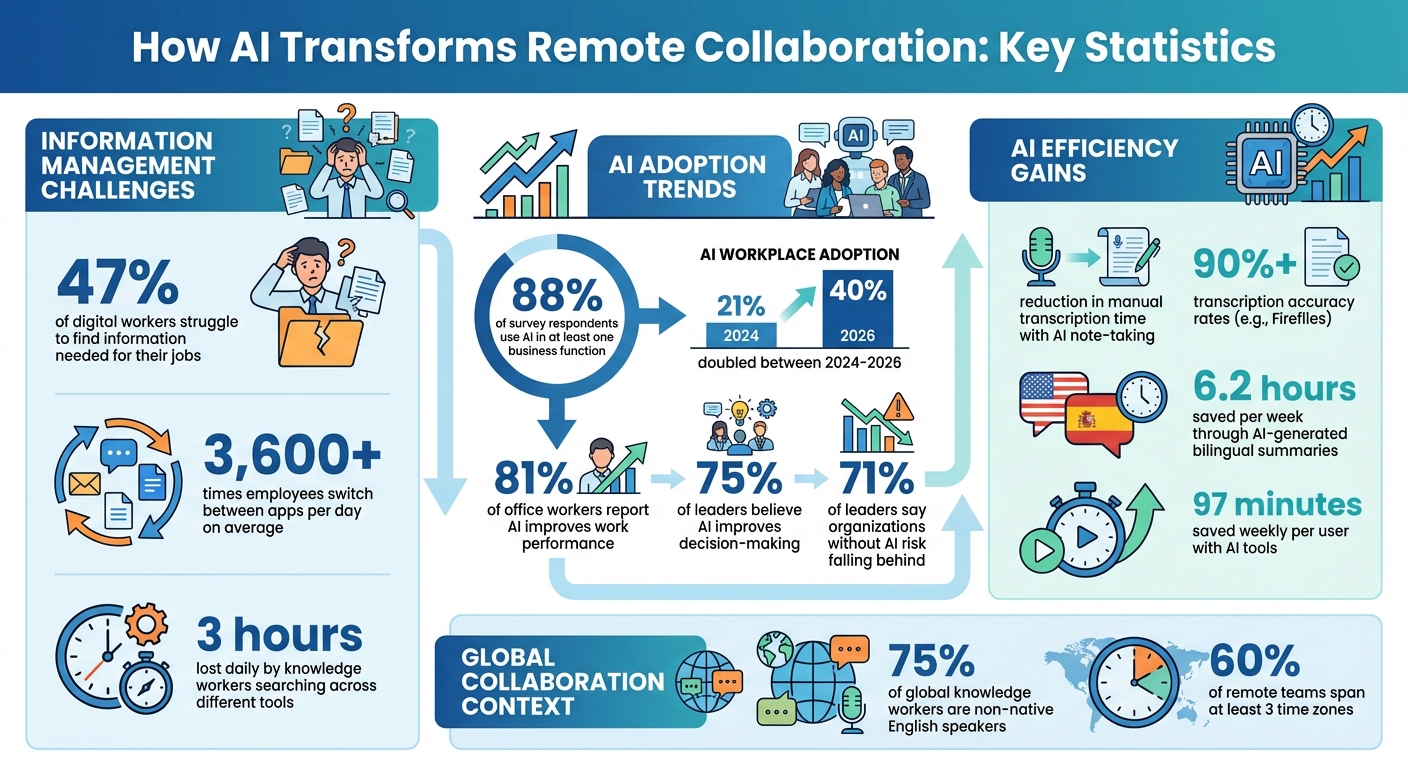
AI Remote Collaboration Statistics: Time Savings and Adoption Rates
Top 10 AI Collaboration Platforms
sbb-itb-058f46d
AI-Powered Information Capture and Organisation
Remote teams often lose valuable time searching for the right information. In fact, 47% of digital workers struggle to find what they need to perform their jobs. On top of that, employees at large organisations switch between apps and windows more than 3,600 times a day on average. This constant back-and-forth disrupts focus and slows down creative and productive work.
AI-powered tools step in to solve this problem by automatically capturing, organising, and retrieving information. Instead of wasting hours digging through files or applications, teams can access what they need in seconds. These tools not only speed up the process but also bring structure to digital workflows, making work more efficient.
Automated Meeting Summaries and Action Items
AI note-taking tools have transformed how we handle meeting documentation. Using voice recognition, these tools convert meeting audio into real-time text transcripts. Advanced algorithms can even distinguish between speakers, so it’s clear who said what during discussions. Once transcribed, natural language processing (NLP) analyses the content to pinpoint key decisions, discussion points, and action items.
The time savings are impressive. AI-driven note-taking can reduce manual transcription time by up to 90%, freeing up hours each week that would otherwise be spent on often-inaccurate manual notes. Tools like Fireflies boast transcription accuracy rates of 90% or higher.
After the meeting, these systems automatically distribute summaries and tasks to shared workspaces or task management platforms. Some AI assistants even provide sentiment and engagement analytics, offering insights into the emotional tone and participation levels during the meeting. However, it’s important to review AI-generated summaries for accuracy, as these tools can occasionally misinterpret subtle nuances or invent details. To maintain transparency and trust, always enable privacy alerts to notify participants when AI recording is active.
Beyond note-taking, AI also improves how teams organise their files and information, as explained below.
Smart Tagging and File Organisation
AI complements meeting summaries with intelligent tagging and file organisation. Universal search tools powered by AI allow teams to search for files, messages, and documents from multiple third-party apps through a single search bar. This eliminates the need to jump between platforms and helps avoid redundant storage practices.
For example, databases like Airtable use AI to classify, categorise, and transform records automatically based on their content. Creative teams can also benefit from AI’s ability to group ideas and feedback into logical clusters or affinity maps on digital whiteboards. These visual groupings make it easier to identify patterns and insights without manually sorting through endless items.
AI’s adoption in the workplace is growing rapidly. 88% of survey respondents reported using AI in at least one business function, and the percentage of people incorporating AI into their work nearly doubled from 21% to 40% between 2024 and 2026. To maximise efficiency, choose AI tools that integrate seamlessly with platforms like Slack, Teams, or Google Drive. This ensures the AI has access to the full context of team activities. Additionally, AI-powered fields in databases maintain consistent categorisation across records, reducing errors from manual tagging.
Finally, when dealing with sensitive data, verify that the AI tools comply with enterprise standards like SOC 2 or GDPR. This ensures your organisation meets security and privacy requirements.
Better Communication Across Time Zones and Languages
AI has made huge strides in simplifying how we manage information, and now it’s tackling one of the toughest challenges for remote teams: bridging gaps in language and time zones. With 75% of global knowledge workers being non-native English speakers and 60% of remote teams spread across at least three time zones, staying connected and fostering collaboration can be tricky. These barriers often slow down conversations and make it harder to bring diverse ideas to the table.
AI-powered translation and captioning tools are changing the game. By combining automatic speech recognition, machine translation, and neural text-to-speech technology, these tools create a seamless real-time communication experience. They even begin translating mid-sentence. Participants have the flexibility to engage in ways that suit them best - whether it’s reading live captions, listening to AI-generated voiceovers in their native language, or both. Beyond real-time collaboration, these tools also make asynchronous workflows smoother, ensuring every team member has a voice.
Real-Time Translation and Captioning
AI translation tools are smarter than ever, offering context-aware translations that avoid common misunderstandings. For example, teams can upload custom glossaries to ensure terms like "ship" are understood as "deploy code" rather than a maritime vessel. Some platforms even include speaker diarisation, which helps differentiate between speakers in multilingual conversations. This makes transcripts and follow-up tasks much easier to manage. These features are crucial for keeping cross-border dialogues flowing and productive.
The benefits go beyond just language translation. Real-time captions help non-native speakers feel more confident, reducing hesitation and encouraging broader participation. Implementing a "captions on" policy can further enhance communication clarity. And for critical discussions, AI can assist with drafting and summarising, while a human interpreter can step in for final reviews and decisions.
Improved Asynchronous Communication
AI tools also shine when it comes to asynchronous work. They can generate bilingual meeting summaries and clear action items, saving teams an average of 6.2 hours per week by cutting down on repetitive back-and-forth communication. On top of that, AI writing assistants help fine-tune tone, flagging language that might come across as harsh or unclear, which reduces the chances of miscommunication. These features complement other automation tools, making remote work smoother and more efficient.
To get the most out of these tools, it’s a good idea to share meeting documents in advance, allowing team members to review and provide input on their own schedules. Maintaining a shared glossary of project-specific terms also ensures consistent translations. Additionally, AI-powered delay-send features can time notifications to match team members’ local hours, respecting their work-life balance.
Automating Workflow Connections and Task Management
Shuffling between apps can kill focus and productivity. In fact, knowledge workers lose about three hours every day just searching across different tools. This challenge, as mentioned earlier, hits remote content teams particularly hard, making collaboration unnecessarily difficult. But here’s where AI steps in - by transforming communication platforms into all-in-one hubs. These hubs let teams handle tasks, update records, and search for data without the constant app-switching.
The results? They’re already showing. On average, users save 97 minutes each week by using AI tools. Take Morningstar's Retirement Group PMO as an example. In September 2025, they used Asana AI Teammates to analyse historical data for a complex project. Senior Project Manager Alina Lamy noted that a task that would have taken one to two weeks for a human was wrapped up by the AI in just a few hours. Even better, the AI uncovered patterns that shaped key decisions for CIO Laura Kohl. Below are a few ways AI is simplifying tool connections and task management.
Connecting Calendars, Task Boards, and Communication Platforms
AI connectors are bridging the gap between brainstorming and execution. Tools like Slack's Workflow Builder and Zapier AI Actions let anyone - no coding required - connect apps like Trello, Gmail, and Google Sheets. All it takes is a simple instruction like: "When a new lead is added in HubSpot, send a Slack message and log it in Google Sheets", and the AI takes care of the rest.
One real-world example comes from Beyond Better Foods. They used Slack AI to streamline logistics and internal communication. COO Jen Haberman relied on the AI’s advanced search and thread summaries to quickly retrieve details about specific order configurations from six months back. This saved her team from manually combing through old messages, speeding up operations significantly.
AI also works wonders for task management. It can turn casual chat messages into actionable tickets, assign tasks, and set deadlines in tools like ClickUp, Asana, or Workast - all in real-time. Need to search across multiple platforms? AI makes it possible to pull data from Jira, Slack, and Google Drive simultaneously, providing context-driven answers with specific references. And don’t worry about security - AI respects user permissions, ensuring sensitive information stays protected. These automated workflows not only free up time but also keep collaboration smooth and clear, especially for remote teams.
Once workflows are set up, AI takes things further by keeping teams in sync with smart notifications and timely reminders.
Smart Notifications and Reminders
AI simplifies notifications by bundling them into concise updates - like daily briefing emails or channel summaries. These updates are designed to cut through the noise, giving teams only the critical information they need. Whether it’s a project status update, a change in plans, or next steps, AI-generated messages make everything clear and actionable.
Tools like Workast take it a step further by automatically reminding team members about overdue tasks or shifted deadlines, removing the need for managers to chase people down. Project management tools like ClickUp and Monday.com use AI to suggest task priorities and even redistribute workloads based on team capacity and deadlines. To get started, try automating one predictable workflow - like weekly status updates or support ticket triage - and expand from there.
Real-Time Collaborative Content Creation
Collaborative documents often face challenges like inconsistent style, formatting, and versions. AI tools integrated into platforms such as Google Docs, Microsoft Word, and Zoom Docs are changing the game by providing live suggestions during co-editing sessions. These features offer instant help with drafting, refining tone, and even translating content. Research shows that AI not only saves time but also enhances teamwork, with 81% of office workers reporting that AI collaboration improves their overall performance. By streamlining workflows, these tools help teams create polished, cohesive content right from the start, leading to better content creation and consistent messaging.
AI-Assisted Content Generation and Editing
AI is a game-changer for tackling creative blocks and ensuring stylistic consistency. It simplifies the drafting process by generating brainstorming prompts, outlines, and content structures based on initial ideas or even meeting transcripts. Teams can easily request real-time edits, such as simplifying complex language, reducing jargon, or rewriting sections for clarity. For example, Microsoft Copilot pulls relevant data from emails, calendars, and databases to inform writing projects, while Notion AI synthesises content from modular blocks and nested databases.
AI also plays a significant role in quality control by offering grammar-sensitive rewrites, inline fact-checking, and readability improvements. However, human editors remain essential to ensure the final content retains its unique voice, nuanced tone, and factual accuracy. Starting with small-scale projects like weekly reports or blog drafts is a smart way for teams to evaluate how AI impacts speed and revision cycles before committing to a broader implementation.
Maintaining Consistency Across Documents
Beyond editing, maintaining a consistent brand voice across all documents is crucial. Tools like Typeface offer a "Brand Hub", which acts as a central repository for brand voice and style guidelines, ensuring AI-generated content stays in line with established standards. Similarly, Microsoft Copilot Tuning allows teams to train document generation models using at least 20 pairs of old and finalised documents, enabling the AI to learn and replicate the required formatting and stylistic nuances for various document types, such as contracts or job postings.
Other tools, like Nuwacom.ai, provide "Voices & Tone Control" features, letting users switch between different writing styles while keeping the core brand identity intact. Zoom Docs takes this a step further by converting meeting transcripts into structured formats like wikis, project plans, or reports, ensuring uniformity across outputs. To maximise the effectiveness of these tools, companies should establish clear internal style guides before integrating AI into their drafting processes. This ensures that the AI aligns with the specific tone and standards of the brand.
Conclusion
AI-powered tools are transforming how remote content teams operate. From automated meeting summaries that keep team members aligned across time zones to real-time translations that eliminate language barriers, these technologies tackle the key challenges of working in distributed setups. In fact, a notable 81% of office workers and 75% of leaders report that AI tools improve both work performance and decision-making processes.
Key Takeaways for Content Teams
AI offers tangible advantages for remote collaboration. Tools like Slack AI are helping users save considerable time every week. By automating repetitive tasks, capturing information seamlessly, and ensuring consistent branding across documents, AI allows content creators to focus on what truly matters: strategic and creative work.
When selecting AI tools, it's essential to address specific pain points, such as communication delays, siloed knowledge, or inconsistencies in content. Choose tools that integrate well with your existing tech stack to avoid creating new data silos. However, it's equally important to maintain human oversight for tasks requiring empathy, critical thinking, or nuanced judgment. AI works best as a partner, handling routine tasks while humans focus on creativity, strategy, and the unique elements that AI cannot replicate.
These immediate improvements set the stage for even greater AI integration in the future.
The Future of AI in Remote Collaboration
AI is moving beyond basic automation to offer proactive and intelligent support. Soon, technologies like ambient intelligence will pre-populate reports and generate first drafts in the background. Collaborative intelligence is evolving AI into a virtual teammate, capable of suggesting resources, identifying project bottlenecks, and even forecasting dependencies. By 2025, it’s predicted that 75% of workplace conversations will be recorded and analysed by AI systems to provide actionable insights and context.
Leadership sentiment is clear: 71% of leaders believe organisations that fail to adopt AI risk falling behind. For content teams in the UAE and beyond, the focus isn’t on whether to embrace AI-powered tools but on how quickly these solutions can be implemented to stay ahead. For UAE-based teams, combining rapid AI adoption with the irreplaceable value of human creativity will be crucial to thriving in today’s increasingly distributed work landscape.
FAQs
How can AI enhance communication for remote teams?
AI is transforming how remote teams interact by taking over repetitive tasks and ensuring more seamless communication. With AI-driven tools, tasks like scheduling meetings, automating follow-ups, and even providing real-time transcription and translation become effortless. This makes working across different time zones and languages much smoother, reducing the chances of miscommunication and keeping everyone on the same page.
What’s more, AI helps create a more inclusive work environment by removing cultural and language barriers. Features such as automated follow-ups and knowledge management systems keep teams organised and allow them to focus on what truly matters - solving problems creatively and fostering stronger professional connections. By simplifying communication, AI frees up time and energy for meaningful collaboration.
How does AI help teams collaborate across different time zones?
AI makes working across time zones much easier by automating scheduling, ensuring meetings are set up effortlessly, no matter where team members are located. It also offers real-time translation and transcription, eliminating language barriers and enabling smoother communication for international teams.
These tools allow global teams to focus on their tasks instead of wasting time on logistical hurdles, ultimately improving efficiency and collaboration.
How does AI enhance task management for remote teams?
AI has transformed how remote teams manage tasks by taking over repetitive activities like updates, approvals, and reporting. This automation gives team members the freedom to concentrate on more strategic and creative responsibilities. It also handles scheduling and reminders efficiently, ensuring tasks are prioritised and deadlines are met without the constant need for manual follow-ups.
Beyond these basics, AI-powered tools bring a whole new level of collaboration. They can analyse data, spot patterns, and fine-tune workflows to help teams work seamlessly across different platforms. For example, these systems can assign tasks based on a team member's specific skills, forecast workloads, and even track performance. This dynamic approach makes remote teamwork feel less fragmented and more fluid. By simplifying processes and enhancing communication, AI helps remote teams operate in a more coordinated and productive way.