

Blog / How Crawl Budget Impacts SEO Rankings
How Crawl Budget Impacts SEO Rankings
When Google crawls your website, it operates within a limited "crawl budget" - the number of pages it can process in a specific timeframe. If this budget is wasted on irrelevant URLs (like duplicate pages or session-specific links), your important content may not get indexed, impacting your search rankings. For UAE businesses, especially large e-commerce sites with thousands of pages, managing this budget is critical to ensure high-value pages like product listings and landing pages are prioritized.
Key Insights:
- Crawl budget depends on your server's capacity and Google's interest in your site.
- Mismanagement can delay indexing of key pages, waste resources on low-value URLs, and reduce site visibility.
- Optimising crawl budget improves search impressions, organic clicks, and revenue.
Quick Tips:
- Block unnecessary pages (e.g., filters, login screens) using
robots.txtornoindextags. - Improve site speed (e.g., LCP under 2.5 seconds) to allow more pages to be crawled.
- Strengthen internal linking to guide crawlers to priority pages.
- Use tools like Google Search Console to monitor crawl activity and identify inefficiencies.
For UAE businesses, where search visibility directly influences revenue, managing crawl budget efficiently is essential to stay competitive.
Crawl Budget Optimization and Advanced Technical SEO Guide
How Crawl Budget Affects SEO Rankings
When Google's bots spend their crawl budget on less important pages, it can negatively impact your site's performance in search results. Here's a closer look at how mismanaging crawl budgets can directly affect SEO rankings.
Delays in Indexing High-Value Content
If bots exhaust their crawl budget before reaching your most important pages, it can lead to delays in indexing. For websites with more than 10,000 pages, Google often prioritises other content, leaving essential updates or new pages unindexed for weeks. This means new product launches, updated services, or fresh blog posts might not show up in search results promptly. According to Seobility, if high-quality pages aren't discovered, they can't rank at all. These delays not only hurt your rankings but also weaken your site's overall credibility.
Wasted Crawls on Low-Value Pages
Another issue arises when bots spend their time crawling pages that add little to no value, such as duplicate content, paginated URLs, search query pages with unusual characters, or login screens. By blocking access to search queries and login pages using robots.txt and applying noindex/nofollow tags, you can redirect crawlers to focus on high-value content. One such optimisation led to impressive results: a 79.5% increase in search impressions, a 61.9% rise in organic clicks, and over AED 2.9 million (approximately US$786,000) in SEO-driven revenue within just three months.
Reduced Site Visibility
Improper use of your crawl budget can also lead to incomplete indexing, where important pages are overlooked. This means key text, links, or images might be missed, which can weaken your site's authority and reduce its visibility in search results. Backlinko notes that when too many pages fall outside your crawl budget, it significantly damages SEO performance. Seobility adds that incomplete crawling can cause search engines to misinterpret your content, potentially leading to long-term traffic declines. For businesses in the UAE, even a slight drop in visibility can have a noticeable impact on market presence.
Factors That Influence Crawl Budget
Knowing what impacts your crawl budget helps you make smarter technical choices. Google pays attention to specific signals from your site, which either encourage or limit how much of its resources are dedicated to crawling your pages.
Site Size and Structure
The number of URLs on your website is a key factor in how Google allocates its crawling resources. For smaller websites with fewer than 10,000 pages, crawl budget is rarely an issue. But larger platforms like ecommerce stores, news sites, or marketplaces with 50,000 or more URLs face a different challenge. When you have thousands of product pages, filter combinations, and category variations, Googlebot has to prioritise which pages to crawl and which to delay.
If your site has a poorly organised or overly deep structure, it can slow down crawls on your most important pages. On the other hand, a well-organised, shallow site hierarchy paired with strong internal linking allows Googlebot to quickly find and crawl your high-priority pages. For example, a UAE-based retailer with extensive product filters (like colour, size, or price range) may unintentionally generate thousands of URL variations. If these filter pages aren’t managed properly, they can waste crawl budget that should be focused on critical product and category pages.
Beyond the structure of your site, the performance of your server also plays a big role in determining crawl efficiency.
Server Performance and Speed
Your server's responsiveness has a direct impact on how many pages Google can crawl. If your server is slow to respond, Googlebot reduces its crawl rate to avoid overloading your site, which means fewer pages are crawled each day. Frequent server errors or timeouts further harm your "crawl health", leading Google to back off even more.
Metrics like Core Web Vitals (such as LCP and CLS) help demonstrate to Google that your site is technically robust. Faster page loads allow Googlebot to process more URLs during each crawl session. For businesses hosting their sites in the UAE or using regional data centres, it’s crucial to ensure low latency and high uptime, especially during peak traffic periods like major sales events. A fast and stable server can handle more activity, enabling Google to crawl more pages in a single visit - an advantage for content-heavy websites.
Content Updates and Freshness
Beyond technical factors, the relevance and freshness of your content also influence crawl demand. Google prioritises sites that consistently provide updated, useful content because fresh information better serves its users. Websites like news platforms, active blogs, or frequently updated product catalogues are crawled more often than static, brochure-style sites.
Regularly updating your pages with meaningful content - whether it’s new product launches, regulatory changes, or seasonal offers tailored to the UAE market - signals to Google that your site is active and worth revisiting. Predictable, high-value updates encourage Googlebot to increase its crawl frequency. For instance, a UAE-based business that consistently publishes locally relevant content on a reliable schedule shows Google that its pages deserve more attention. This doesn’t mean updating every single page daily, but focusing on maintaining steady, high-quality updates for your most important sections.
sbb-itb-058f46d
Signs of Crawl Budget Problems
Identifying crawl budget issues early is crucial for maintaining your site's visibility and avoiding potential ranking setbacks. Properly managing your crawl budget ensures better indexing and helps prevent the challenges mentioned earlier. Tools like Google Search Console and server logs are invaluable for uncovering crawl inefficiencies.
Insights from Google Search Console
Google Search Console provides two key reports that can help you spot crawl budget problems. The Crawl Stats report shows how often Google crawls your site, how much data is downloaded, and which pages are prioritised. If you notice excessive crawling of low-value URLs - such as internal search results (e.g., /search?q=foreign-characters) or login pages - while your critical product or content pages are overlooked, this indicates wasted crawl budget.
The Coverage report is another useful tool. It highlights pages that Google flagged as "not indexed." If important pages remain in these categories for weeks, it suggests Google discovered them but opted not to index them, potentially because the crawl budget was exhausted before reaching them. For businesses in the UAE with bilingual sites in English and Arabic, unindexed Arabic pages deserve extra attention. Right-to-left parameter URLs can sometimes create inefficiencies, similar to issues with foreign characters.
As discussed earlier, you can redirect Googlebot's focus to your key pages by blocking low-value URLs using tools like robots.txt and applying noindex or nofollow rules. This approach can lead to noticeable improvements in search impressions, organic traffic, and revenue growth.
Next, delve into your server logs to uncover additional crawl inefficiencies.
Log File Analysis
Server logs provide a detailed record of every request Googlebot makes, including timestamps, status codes, and the specific URLs visited. Analysing these logs can reveal crawl patterns that Google Search Console might not show. If more than 10% of Googlebot's activity targets low-value pages - such as tag pages, paginated URLs, or duplicates - you should take action to minimise these URLs. Ideally, less than 5% of crawl activity should involve low-value pages.
Server logs can also expose technical issues, such as frequent 404 errors or redirect chains, which waste valuable crawl budget. For large UAE-based retailers with extensive product filtering options (e.g., colour, size, price), logs can reveal whether filter combinations are generating thousands of unnecessary URLs for Google to crawl. Addressing these inefficiencies by blocking irrelevant URLs ensures your crawl budget is directed to the pages that matter most.
Beyond the numbers, server logs provide concrete evidence of crawl budget misallocations.
Partial or Delayed Indexing
A limited crawl budget can result in incomplete page fetches, leaving out critical elements like text, links, or images. This partial indexing can significantly harm your rankings. In Google Search Console, you might see "Partial HTML" exclusions in the Coverage report or find that new, high-priority pages - such as seasonal product launches - remain marked as "Discovered - not indexed" for weeks, even if you've submitted them via your sitemap.
Server logs can confirm delayed indexing by showing low crawl frequency on your high-priority pages while less important URLs receive repeated visits. If your newly published content takes over seven days to appear in search results and your logs indicate wasted crawl budget on irrelevant pages, it’s a clear sign that adjustments are needed to reallocate resources effectively.
How to Optimise Crawl Budget for Better Rankings
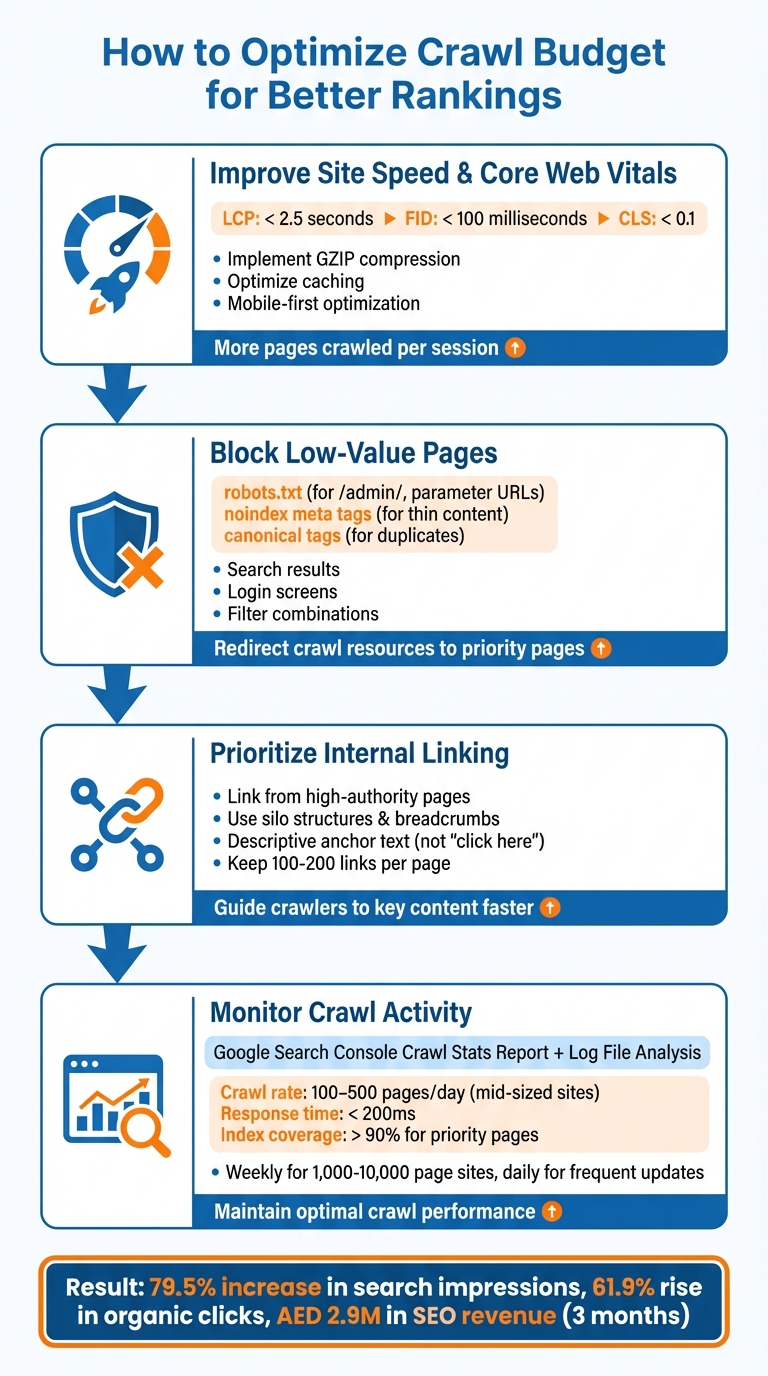
4-Step Crawl Budget Optimization Process for Better SEO Rankings
After identifying crawl budget issues, the next step is to implement targeted solutions that shift Googlebot's focus to your most valuable pages. By addressing inefficiencies, you can ensure crawl resources are directed towards high-impact content, improving rankings for your priority pages.
Improve Site Speed and Core Web Vitals
A faster site allows crawlers to cover more ground during each visit. When your server responds quickly and pages load efficiently, Googlebot can index more URLs instead of waiting for sluggish resources. Aim for Largest Contentful Paint (LCP) under 2.5 seconds, First Input Delay (FID) under 100 milliseconds, and Cumulative Layout Shift (CLS) under 0.1 - these metrics are critical indicators of crawl health in Google's eyes.
To achieve this, consider implementing GZIP compression to reduce data sizes and optimise caching protocols to streamline resource delivery. For websites in the UAE, where mobile traffic dominates (over 90% mobile penetration), mobile-first optimisation is essential for fast load times across devices. Tools like Google PageSpeed Insights can help you measure performance and identify areas for improvement. Faster sites not only enhance user experience but also enable Googlebot to index new content more efficiently, boosting the visibility of your key pages.
Block Low-Value Pages
An effective way to optimise crawl budget is by preventing search engines from wasting resources on irrelevant or duplicate content. Update your robots.txt file to block directories like /admin/ or pages with parameters such as ?sort=asc. Use noindex meta tags for thin content (e.g., tag archives, outdated posts, or multimedia embeds) and apply canonical tags to consolidate duplicate versions of pages (e.g., HTTP vs. HTTPS or www vs. non-www).
By blocking low-value URLs, such as search result pages or login screens, you can redirect crawl resources to product and content pages that matter most. Regularly updating your XML sitemap ensures only high-priority URLs are submitted, keeping unnecessary pages out of Google's crawl queue.
Prioritise Internal Linking to Key Pages
Once technical fixes are in place, strong internal linking can guide crawlers to your most important content. Linking from high-authority pages, like your homepage or category hubs, to key pages ensures they’re indexed quickly. Use silo structures and breadcrumb navigation to group related pages logically, making it easier for Googlebot to navigate and prioritise your site. For example, descriptive anchor text like "luxury apartments in Abu Dhabi" is far more effective than generic phrases like "click here." Keep links per page between 100 and 200 to maintain link equity.
Placing crucial links in prominent areas, such as headers or footers, can further enhance indexing efficiency. This approach is particularly helpful for large websites with over 10,000 pages - common among UAE retailers offering extensive filtering options (e.g., by size, colour, or price) - ensuring that your crawl budget focuses on revenue-generating content.
Monitor Crawl Activity Regularly
Regular monitoring of crawl activity is essential for maintaining optimal performance. Use Google Search Console's Crawl Stats Report to track metrics like bytes downloaded per day, average response time, and crawl frequency. Look out for red flags such as high server load, low crawl rates on key pages, or excessive 4xx/5xx errors. For sites with 1,000–10,000 pages, checking these metrics weekly - or daily if you publish frequent updates - is a good practice.
Pair this data with log file analysis to gain deeper insights into Googlebot's crawling behaviour. Ideally, mid-sized sites should aim for crawl rates of 100–500 pages per day, response times under 200 milliseconds, and over 90% index coverage for priority pages. If your crawl rates are falling behind your site's growth, it may be time to revisit speed improvements or refine internal linking strategies. Tools like Screaming Frog can complement Google Search Console for more detailed audits, helping you maintain strong crawl performance over time.
Conclusion
Understanding the role of crawl budget in SEO highlights the importance of directing Google's crawling efforts towards pages that truly matter. While crawl budget isn't a direct ranking factor, it plays a crucial role in determining which pages get discovered, indexed, and ultimately ranked. If Googlebot spends too much time on low-value pages, high-value content may remain uncrawled and invisible, potentially impacting organic traffic and revenue. This makes optimising your crawl budget a key step in improving your site's overall performance.
Focusing on crawl efficiency can lead to tangible benefits. By blocking irrelevant pages, improving site speed, and refining internal links, you can ensure that Google's resources are directed where they matter most. Businesses that have implemented targeted crawl budget strategies have seen noticeable improvements in search impressions, organic clicks, and even revenue growth.
Key Takeaways
Fine-tuning your crawl budget strategy is essential for better indexing, improved visibility, and higher rankings. Here’s how you can achieve this:
- Boost Core Web Vitals: Enhancing site performance speeds up crawling and indexing.
- Block Low-Priority Pages: Use tools like robots.txt or noindex tags to exclude irrelevant pages.
- Strengthen Internal Links: Guide crawlers to your most important content with a well-structured linking strategy.
- Monitor Crawl Activity: Tools like Google Search Console's Crawl Stats Report can help you spot inefficiencies, such as high server loads, frequent errors, or low crawl rates on key pages.
For businesses in the UAE - especially eCommerce platforms with large product catalogues and filters - managing crawl budget is critical to staying competitive. Websites with frequent updates or extensive inventories can greatly benefit from these strategies, ensuring that new products and pages appear in search results quickly. By treating crawl budget as a finite resource and using it wisely, you can unlock your site's full potential while reducing dependence on paid advertising.
FAQs
How can I tell if my website has crawl budget issues?
To figure out if your website might be dealing with crawl budget issues, start by checking the Crawl Stats Report in Google Search Console. Pay attention to patterns like consistently low crawl rates, a high number of errors, or pages that remain unindexed.
Another helpful step is analysing your server logs. This can give you a clearer picture of how search engine bots are interacting with your site. If you spot important pages being skipped or left unindexed, it could point to a problem with how your crawl budget is being managed.
Fixing these issues is essential to help search engines efficiently navigate and index your site, which plays a key role in keeping your SEO performance on track.
How can I make my website more efficient for search engine crawling?
To make your website easier for search engines to crawl, start by refining its structure. Create a clear and logical hierarchy, and cut down on unnecessary URLs. Use robots.txt and meta tags to block pages that don’t need to be indexed. Don’t forget to submit an updated XML sitemap to search engines regularly to guide them through your site.
Address technical issues like broken links, duplicate content, and URL conflicts. Using canonical tags can help resolve duplication problems effectively.
Site speed and mobile responsiveness also play a big role. Faster-loading pages not only improve user experience but also encourage search engines to crawl your site more efficiently. Focus on your most important pages by using strategic internal linking, and restrict crawling for less critical ones. These changes can make a noticeable difference in how well search engines process and rank your site.
Why is managing crawl budget important for large e-commerce websites?
Managing your crawl budget is crucial for large e-commerce websites, especially those with thousands of URLs. It ensures that search engines can effectively find and index your most important product pages and content. Without proper oversight, some critical pages might not get indexed, which could hurt your site's performance.
By fine-tuning your crawl budget, you can stop search engines from spending time on less important or duplicate pages. This helps improve your site's visibility in search results, boosts user experience, and strengthens your SEO efforts - key advantages in competitive markets like the UAE.