
Blog / How to Choose the Right CRM for Link Building
How to Choose the Right CRM for Link Building
Managing link-building campaigns is complex - tracking prospects, maintaining relationships, and monitoring links can quickly become overwhelming without the right tools. A CRM designed for link building simplifies this by centralising contacts, automating email outreach, and tracking link performance.
Key takeaways:
- CRMs streamline outreach with features like contact segmentation, email automation, and follow-up triggers.
- Integration with SEO tools (Ahrefs, SEMrush, Moz) helps track metrics like Domain Authority (DA) and monitor links for issues like no-follow tags or 404 errors.
- Options like BuzzStream, Pitchbox, Respona, and BacklinkManager cater to different needs and budgets, from small teams to enterprise-level campaigns.
For UAE businesses, ensure the CRM supports VAT invoicing, Arabic language, and local data protection laws. Test platforms through free trials to find the one that aligns with your team's goals and workflow.
Linkee AI Review: Backlink Outreach Tool with AI Integration
Required Features in a Link Building CRM
The right CRM can turn the chaos of managing link-building campaigns into an organised, efficient process. However, not all CRMs are suited for this specific task. To handle the unique demands of outreach, relationship management, and link tracking, you need tools tailored for the job.
Contact Management and Segmentation
A good link-building CRM centralises all your prospect data - website URLs, webmaster contact details, social media profiles, and a full history of interactions - into one organised system. This setup is a lifesaver when juggling hundreds of potential partners.
Segmentation is key to effective outreach. By grouping contacts based on factors like industry, relationship type (e.g., blogger vs. journalist), or engagement level, you can ensure each message is targeted to the right audience. For example, a pitch to a tech blogger will naturally differ from one aimed at a news editor. With segmentation, these distinctions are handled effortlessly.
"If you are not using any CRM yet, before you start testing out different platforms or tools, make a list of your biggest pain points." - Milosz Krasinski, Chilli Fruit Web Consulting
Custom pipeline stages are another must-have. Tailor your CRM to reflect the link-building process, with stages like Identification, Contact Made, In Progress, Agreement, and Verification. This structure keeps your team on the same page about each prospect's status.
Once your contacts are organised and segmented, automating personalised outreach becomes much simpler.
Email Automation and Personalisation
Sending individual emails manually is simply not scalable. Automation helps your team work like an assembly line, dividing tasks to handle a larger volume of outreach. Key features to look for include automated email sequences, follow-up reminders, and templates that pull in CRM data for personalisation.
Some CRMs take this further with advanced drip campaigns triggered by recipient actions. For instance, if someone opens your email but doesn’t reply, the system can send a customised follow-up automatically. A few even use AI to analyse a prospect’s website and suggest tailored snippets for your emails.
"Direct email integration facilitates higher levels of personalisation and better-informed conversations, producing higher response and conversion rates." - Alexandra Tachalova, Founder, Digital Olympus
Set up at least two or three follow-up steps in your campaigns - these often generate the majority of replies. Also, make sure your CRM includes email verification tools to reduce bounce rates and protect your sender reputation.
Integration with SEO and Analytics Tools
To maximise the impact of your efforts, your CRM should integrate seamlessly with SEO and analytics tools. Platforms like Ahrefs, SEMrush, Moz, and Majestic can feed critical metrics such as Domain Authority (DA), Page Authority (PA), and organic traffic directly into your CRM dashboard. Without this, you’re stuck wasting time manually checking each prospect’s metrics, which is both inefficient and prone to errors.
Real-time link monitoring is a must. Your CRM should provide 24/7 tracking of acquired links, alerting you instantly if a link turns into "no-follow", disappears, or generates a 404 error. Some systems even use browser simulations to verify that links are visible to users, not just present in the HTML.
| Feature Category | Essential Capabilities |
|---|---|
| Contact Management | Segmentation, interaction history, custom fields, labels |
| Outreach Automation | Email sequences, drip campaigns, follow-up triggers, templates |
| SEO Integration | DA/DR metrics, GSC/GA4 sync, backlink quality analysis |
| Monitoring | 24/7 tracking, 404 alerts, no-follow detection |
Integrating with tools like Google Analytics and Search Console allows you to tie link-building efforts directly to SEO outcomes, such as keyword ranking improvements and organic traffic growth. For example, the agency uSERP used these integrations to secure over 300 backlinks per month for clients while maintaining high standards of quality and efficiency.
To stay ahead, configure your CRM to send instant alerts for any changes to high-value links. Filters that focus on metrics like Domain Rating above 50 can help you prioritise prospects and maximise your return on investment.
Comparing CRM Options: Features, Integrations, and Pricing
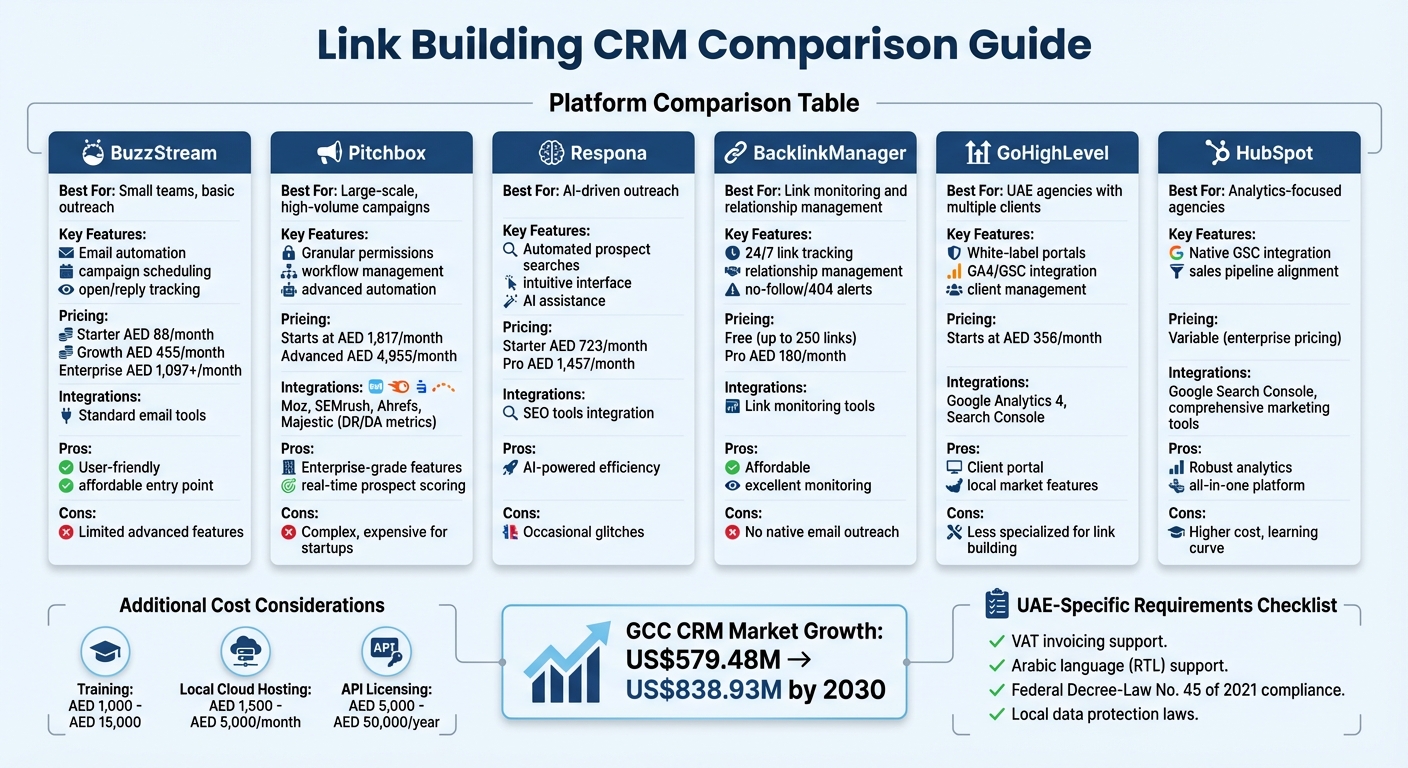
CRM Platform Comparison for Link Building: Features, Pricing and Best Use Cases
Feature Comparison and Use Cases
When choosing a CRM, consider how well it aligns with your team size and outreach needs. For smaller teams handling basic outreach, BuzzStream is a solid option.
"At Bring Digital, we primarily use Buzzstream to replace manually emailing journalists. We use it to automate outreach, schedule campaigns, send follow-up emails and track open and reply rates." – Siobhan Congreve, Associate Director, Bring Digital
For larger-scale campaigns, Pitchbox stands out with its granular permissions and workflow management, making it a better fit for high-volume operations. However, as Michael King, Founder of iPullRank, points out, its complexity and cost may pose challenges for startups. If you're looking for AI-driven tools, Respona offers an intuitive interface and automated prospect searches, though it occasionally experiences glitches.
BacklinkManager is tailored for managing relationships and monitoring links continuously but doesn't include native email outreach. On the other hand, GoHighLevel provides white-label client portals and integrates data from GA4 and GSC, making it a great choice for UAE agencies handling multiple clients.
These distinct features make it easier to match the right CRM to your specific business needs.
Integration with Marketing Tools
A CRM's ability to integrate with your existing marketing tools is critical. Pitchbox, for example, connects seamlessly with Moz, SEMrush, Ahrefs, and Majestic, allowing you to pull Domain Rating (DR) and Domain Authority (DA) directly into your dashboard. This automation reduces manual data entry and enables real-time prospect scoring.
For analytics-focused agencies, HubSpot offers native integration with Google Search Console, simplifying the process of aligning SEO insights with sales pipelines.
"Connecting your CRM with GA4, GSC, or analytics tools will save time and keep your reporting consistent." – The Reverb Team
Additionally, automated alerts for link issues like no-follow tags or 404 errors can help you act quickly and maintain link quality.
Pricing for UAE Businesses
CRM pricing can vary significantly based on features and scale. For those just starting, BacklinkManager offers a free plan for up to 250 links, with the Pro plan priced at around AED 180 per month. BuzzStream starts at approximately AED 88 per month for its Starter plan, while its Growth tier costs AED 455, and enterprise options exceed AED 1,097.
Mid-sized agencies might find Respona appealing, with plans starting at around AED 723 per month for the Starter plan and AED 1,457 for Pro. For enterprise-level capabilities, Pitchbox starts at AED 1,817 per month, with advanced plans reaching AED 4,955. Meanwhile, GoHighLevel, a favourite among UAE agencies for its white-label portals, begins at approximately AED 356 per month.
When budgeting, remember to account for additional costs like training (ranging from AED 1,000 to AED 15,000), local cloud hosting (AED 1,500 to AED 5,000 monthly), and API licensing fees for third-party integrations (AED 5,000 to AED 50,000 annually). Always request quotes in AED, including VAT, support, and upgrades, to avoid surprises.
sbb-itb-058f46d
How to Select and Implement Your CRM
Define Your Link Building Goals and Team Requirements
Before diving into any CRM platform, take a step back and clarify your needs. Are you focusing on outreach management (finding and contacting prospects) or relationship management (tracking links and partnerships)? List out your current pain points - like losing track of links, dealing with disorganised spreadsheets, or slow follow-ups - and rank them by priority. This will help you identify the must-have features for your CRM.
Also, think about your team size and where you're headed. A solo link builder will have very different needs compared to an agency managing multiple clients. If you're handling complex campaigns or expect to scale, look for a CRM that can grow with you. Features like contact segmentation, automated email sequences, 24/7 link monitoring, and integration with SEO tools like Ahrefs or SEMrush are often essential.
Map out your outreach process with clear pipeline stages and define key data fields like Website URL, Contact Info, Backlink Quality, and Last Contact Date. This will help you stay organised and ensure the CRM aligns with your workflow.
Test CRM Platforms with Free Trials or Demos
Once your goals are clear, it's time to test potential CRMs. Take advantage of free trials or demos to get a feel for the platform. Pay close attention to the user interface - if it’s too complicated, your team might struggle to adopt it. Try running real outreach sequences during the trial to see how well the CRM fits into your daily operations.
Make sure the CRM integrates seamlessly with your email, SEO, and analytics tools. Check if you can generate custom reports that provide insights into outreach performance, link quality, and team efficiency. It's also a good idea to involve your link builders in the testing phase. After all, they’ll be the ones using it most, so their input is invaluable.
For more advanced platforms, schedule a demo to understand how specific features can address your unique needs. Weigh the potential time savings and efficiency improvements against the subscription cost, especially if you're considering a higher-priced option.
Set Up and Optimise Outreach Workflows
After choosing your CRM, the next step is to fine-tune your workflows. Start by centralising communication - integrate emails, tasks, and notes into the platform. Organise your prospects into pipeline stages like 'Needs Action,' 'Awaiting Response,' or 'Closed' to keep your outreach efforts on track.
Set up automated email sequences and reminders to maintain consistent communication without the hassle of manual follow-ups. Enable instant alerts for link monitoring to stay updated on any changes. Use a Lead Tracker to categorise replies by status (e.g., Won, Lost, or Open) and type (such as Backlink, Guest Post, or Social Share). To take it a step further, connect your CRM with tools like Ahrefs, Moz, or SEMrush to view metrics like Domain Rating directly within the platform.
This structured approach ensures your team can handle growth efficiently while maintaining strong relationships with webmasters and publishers.
Conclusion
Choosing the right CRM comes down to aligning the platform's features with your business goals and outreach strategy. Whether your focus is on high-volume prospecting with email automation or managing long-term partnerships and tracking link health, the CRM you select should fit seamlessly into your workflow.
Integration is key. Your CRM should work smoothly with SEO and email tools, such as Ahrefs, Moz, or SEMrush, to bring authority metrics directly into your process. For businesses in the UAE, it's essential to ensure the CRM supports local requirements like VAT invoicing, Arabic language (RTL) support, and compliance with Federal Decree-Law No. 45 of 2021 on data protection.
Pricing and scalability are equally important. Beyond the software's base cost, consider expenses like data migration, customisation, and training. With the CRM market in the GCC expected to grow from US$579.48 million to US$838.93 million by 2030, the demand for digital tools in the region is only increasing. Take advantage of free trials to test platforms using real data, involve your team in the decision-making process, and ensure the system can scale as your link-building campaigns grow.
The right CRM can turn scattered efforts into organised, measurable results. By selecting a platform that matches your outreach needs, you’ll create a centralised system that boosts efficiency, strengthens partnerships, and delivers clear, impactful outcomes.
FAQs
What key features should I look for in a CRM to enhance link building?
When choosing a CRM for link building, it’s important to focus on features that make your workflow smoother and boost productivity. Look for tools that excel in contact management, email campaign tracking, and backlink monitoring. These features help keep your outreach efforts organised and on track. Strong reporting and analytics capabilities are also a must, as they allow you to measure performance and refine your strategies effectively.
It’s also wise to choose a CRM that integrates well with SEO tools and offers task allocation features. This ensures your team can collaborate easily and efficiently. Don’t forget to evaluate pricing in AED to ensure it fits within your budget while meeting your business needs. This approach can help you achieve consistent growth in the UAE market.
How does integrating a CRM with SEO tools improve link-building efforts?
Integrating a CRM with SEO tools can take your link-building strategy to the next level by bringing everything you need into one place and automating repetitive tasks. With real-time performance tracking, you can keep a close eye on how well your outreach campaigns are performing and ensure your backlinks are of the highest quality. Plus, automation features like email follow-ups and backlink status updates save you time and cut down on manual work.
On top of that, a CRM offers detailed reporting and analytics, giving you the insights needed to make smarter, data-driven decisions. This combination of tools not only boosts efficiency but also helps you build stronger connections and achieve better outcomes in your link-building efforts.
What factors should UAE businesses consider when choosing a CRM for link building?
When choosing a CRM for link-building efforts, businesses in the UAE should focus on features such as contact management, email campaign tracking, and compatibility with SEO tools. These functions are essential for managing outreach and tracking results efficiently.
Automation can be a game-changer, helping to streamline repetitive tasks and save time, while reporting tools are crucial for keeping an eye on how your backlinks are performing. It's also important to ensure the CRM supports your specific link-building strategies and enhances relationship management with prospects and partners.
Lastly, review the pricing in AED (د.إ) to ensure the software provides good value and stays within your budget. Balancing cost with functionality is key to making the right choice.