

Blog / Checklist for Crawlability and Indexability Testing
Checklist for Crawlability and Indexability Testing
When search engines can't find or process your site, your content won't rank - no matter how good it is. For businesses in the UAE, where mobile traffic dominates (over 60% as of January 2024), ensuring your website is crawlable (easily discoverable) and indexable (stored in search engine results) is critical. Here's why it matters:
- 53% of users leave pages that take over 3 seconds to load. A one-second delay can reduce conversions by 7%.
- 96% of websites fail Core Web Vitals tests, impacting rankings and user experience.
- Broken links and poor internal linking affect SEO, with 52% of sites struggling with these issues.
Key steps to improve crawlability and indexability include:
- Checking your robots.txt file to avoid blocking important pages.
- Fixing broken links and improving internal link structure (ensure pages are no more than 3 clicks from the homepage).
- Optimising crawl budget by blocking unnecessary URL parameters and improving server response times.
- Using tools like Google Search Console to monitor indexing issues and resolve errors like "Discovered - currently not indexed."
Addressing technical issues like server errors, slow loading speeds, and mobile compatibility ensures search engines can process your site effectively. For UAE businesses, regular audits and fixes are essential in a competitive digital market, where SEO plays a direct role in driving revenue growth.
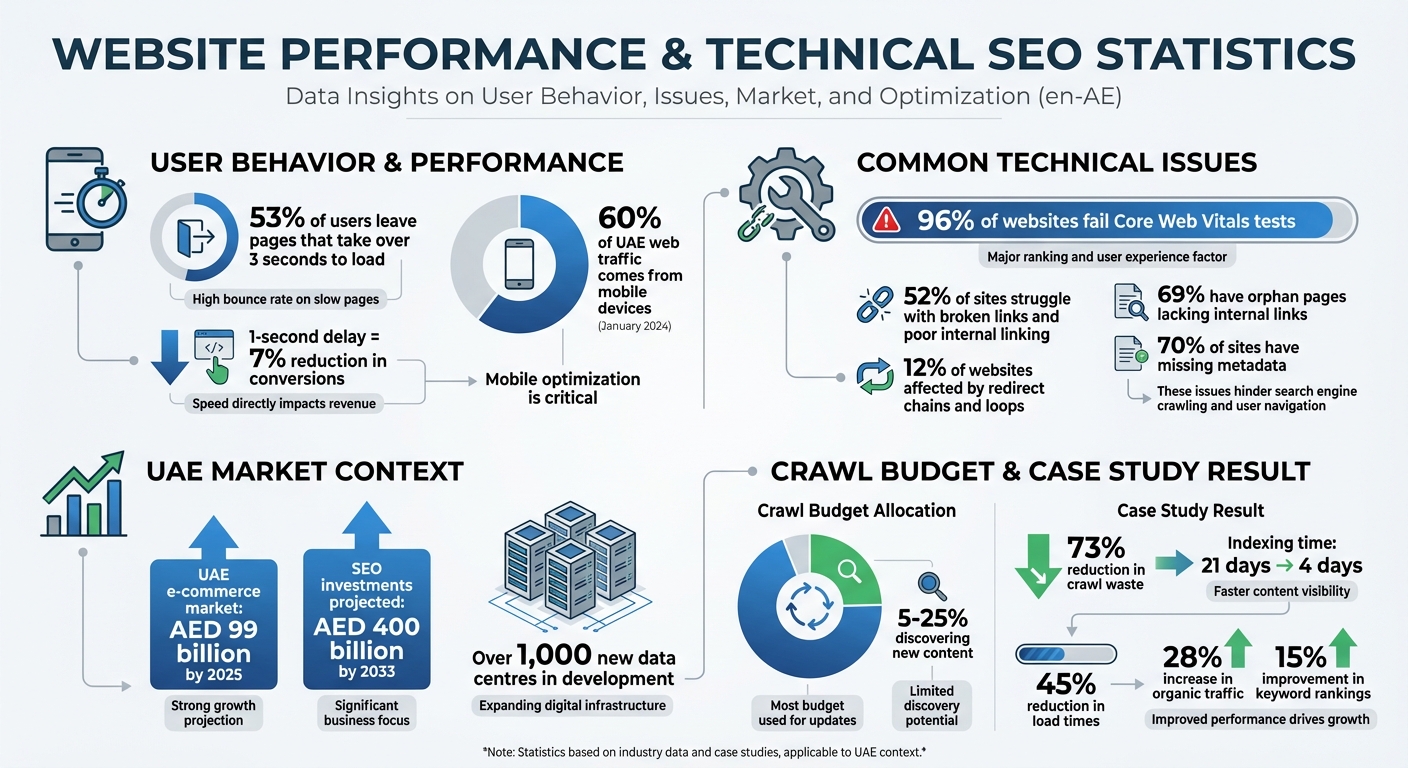
UAE Website Performance Statistics: Crawlability and Indexability Issues
How to Make Google Crawl and Index Your Website Faster 🚀 Even when "Crawled Currently Not Indexed"
Testing Website Crawlability
Making sure search engines can effectively crawl your site is a key part of boosting its overall performance. To do this, focus on three main areas: your robots.txt file, internal links, and crawl budget.
Check Your Robots.txt File
The robots.txt file, found at yourdomain.com/robots.txt, acts like a gatekeeper for search engine crawlers. It tells them what they can and cannot access. Start by visiting this file to ensure that no critical pages are accidentally blocked. For example, a rule like Disallow: / blocks the entire site, making it invisible to search engines - a mistake you definitely want to avoid.
Tools like Google Search Console's robots.txt Tester and URL Inspection tool can help pinpoint blocked URLs and explain why they’re restricted. Additionally, make sure your CSS and JavaScript files are not blocked. These files are essential for proper page rendering, and blocking them can make your content inaccessible, even if the HTML is available.
"Generally speaking, the sites I see that are easy to crawl tend to have response times there of 100 millisecond to 500 milliseconds... If you're seeing times that are over 1,000ms... that would really be a sign that your server is really kind of slow and probably that's one of the aspects it's limiting us from crawling as much as we otherwise could" – John Mueller, Search Advocate at Google
Review Internal Link Structure
Search engines rely on links to discover pages. A poorly organised linking structure or broken links can severely limit crawlability. Ideally, most pages on your site should be no more than three clicks away from the homepage. Pages that take four or more clicks to reach tend to be crawled less often and are considered less important.
Use a crawl tool to identify orphan pages (pages with no internal links) and those with a crawl depth of four or more. Add internal links from key pages and fix any broken links or redirect chains.
With over 60.08% of web traffic in the UAE coming from mobile devices as of January 2024, it's vital to ensure your site's navigation and internal linking are mobile-friendly. Breadcrumb menus with structured data markup can also help search engines understand your site's hierarchy more effectively.
After addressing internal links, turn your attention to crawl budget allocation.
Check Crawl Budget Allocation
Crawl budget refers to the balance between how much Google wants to crawl your site and how much your server can handle. Most of Google’s crawl budget (75%–95%) goes toward revisiting existing pages, while only 5%–25% is used to discover new content. If your crawl budget is wasted on low-value pages, important content might not get crawled.
For example, one mid-size e-commerce site cut crawl waste by 73% and reduced the time it took for new products to be indexed from 21 days to just 4. They achieved this by blocking unnecessary URL parameters and optimising server response times.
To monitor your crawl budget, check Google Search Console's Crawl Stats (Settings → Crawl Stats) for any dips in "Total crawl requests" or spikes in "Average response time". Review server logs for URLs with parameters like ?, sort=, or filter= - these can lead to wasted crawl budget. If you see many pages marked as "Discovered - currently not indexed" in GSC, it’s often a sign that Google didn’t think those pages were worth crawling.
| Metric | Target/Healthy Range | Impact on Crawling |
|---|---|---|
| Average Response Time | <500ms (Target: <200ms) | High latency (>1s) causes Google to throttle crawl rate |
| 200 OK Responses | >95% | High success rates encourage more frequent crawling |
| 5xx Server Errors | <0.1% | Errors signal server issues, leading to reduced crawling |
| Crawl Waste | <10% of total requests | Wasting crawl budget on parameters limits new content discovery |
Testing Website Indexability
Once you've confirmed that your website is crawlable, the next step is to ensure that the crawled pages are actually indexed. Without proper indexing, even the most optimised content won't appear in search results.
Check Index Status Using Google Tools
Start by running a quick check using the "site:" operator (e.g., site:yourdomain.com/page-url) to see if a specific page is included in Google's index. For a more detailed review, use the Google Search Console (GSC) URL Inspection Tool. Enter the URL in the search bar to check its "Page verdict." If the verdict states "URL is not on Google", expand the "Page indexing" section to uncover possible issues like blocks from robots.txt or noindex tags.
The Page Indexing Report in GSC offers a broader look at your site's status. It shows how many pages Google has indexed and highlights reasons for exclusions. Regularly reviewing this report - ideally once a month - can help you spot patterns. A steady increase in indexed pages is a positive sign, while sudden spikes in "Not indexed" pages call for investigation. Use the report's filters to focus on URLs submitted via your XML sitemap, ensuring your priority pages are being processed.
Some common indexing issues you might encounter include:
- "Crawled - currently not indexed": Google has crawled the page but hasn't indexed it yet.
- "Discovered - currently not indexed": Google knows the URL exists but hasn't crawled it yet.
If you address problems like server errors or accidental noindex tags, use the "Validate Fix" option in GSC to prompt Google to recheck the issue. Keep in mind that this validation process can take up to two weeks.
Review Noindex and Canonical Tags
One common cause of indexing problems is the accidental use of noindex tags, which instruct search engines not to include a page in search results. These tags can appear in your HTML <head> section, as X-Robots-Tag HTTP headers, or through JavaScript. Use GSC to inspect rendered HTML and identify any unexpected noindex tags.
Canonical tags, on the other hand, are used to consolidate ranking signals for duplicate or similar content by pointing to a preferred URL. Unlike noindex tags, canonical tags don't remove pages from the index but instead guide search engines to prioritise one version of the content. The URL Inspection Tool in GSC will show both the "Google-selected canonical" and the "User-declared canonical." If these differ, Google may choose to index a version you didn’t intend.
To avoid confusion, ensure that your key pages use self-referencing canonical tags. Problems often arise when XML sitemaps, canonical tags, and internal links point to different versions of the same page, forcing Google to decide which one to index.
| Feature | Noindex Tag | Canonical Tag |
|---|---|---|
| Primary Purpose | Prevents a page from being indexed | Identifies the preferred version of a page |
| Nature of Signal | Directive (mandatory instruction) | Hint (Google may choose a different URL) |
| Search Result Impact | Page is removed from search results | Only the canonical version appears in results |
| Best Use Case | Admin pages, thank-you pages, internal search | Product variations, duplicate blog posts, tracking URLs |
Review Your XML Sitemap
An XML sitemap serves as a guide for search engines, highlighting your site's most important pages for indexing. To maximise its effectiveness:
- Include only canonical, indexable URLs.
- Exclude pages with noindex tags, duplicate content, or unnecessary parameters.
- Submit the sitemap through GSC to monitor parsing issues and track how many URLs have been indexed.
Make sure all pages in the sitemap are accessible via internal links, as Google primarily discovers pages by crawling links. Sitemaps act as a backup to improve discoverability. Use the lastmod attribute in your sitemap to help search engines prioritise recrawling.
If you're working on a large site or troubleshooting specific issues, consider creating a temporary sitemap with only the affected URLs. This can help you speed up validation by isolating problem areas in your GSC reports.
sbb-itb-058f46d
Finding and Fixing Technical Problems
After you’ve ensured your site is crawlable and indexable, the next step is tackling technical issues that could hurt performance. Problems like server errors, slow loading speeds, and mobile display issues not only hinder search engines but can also frustrate visitors.
Fix Server Errors and Redirects
Once you’ve confirmed crawlability and indexability, it’s time to address server and redirect issues that could slow down search engines. Server errors, in particular, are some of the most damaging for crawlability. For instance:
- A 500 Internal Server Error often stems from coding issues in your CMS or faulty PHP scripts.
- A 502 Bad Gateway means one server received an invalid response from another.
- A 503 Service Unavailable error can cause Googlebot to slow or halt crawling to avoid overloading your server.
If your robots.txt file returns a 5xx error, Google may stop crawling your site entirely for up to 12 hours. To identify these problems, use the Crawl Stats report in Google Search Console. Check for spikes in 5xx errors and review the "Host Status" section for DNS or connectivity issues.
If Googlebot is crawling too aggressively and triggering 503 errors, return a 503 or 429 (Too Many Requests) status code for a couple of days to signal it to slow down. Redirect issues, such as loops or long chains, should also be fixed by updating internal links to point directly to the final destination URL. Redirect chains and loops waste crawl budgets and increase latency, with about 12% of websites affected by these issues.
| Error Code | Name | Common Cause | SEO Impact |
|---|---|---|---|
| 500 | Internal Server Error | CMS/PHP coding bugs | Prevents indexing of affected pages |
| 502 | Bad Gateway | Upstream service failure | Blocks crawler access |
| 503 | Service Unavailable | Server overload/maintenance | Slows or halts crawling |
| 504 | Gateway Timeout | Slow server response | Googlebot abandons the request |
Improve Page Speed
Page speed plays a crucial role in both user experience and crawl efficiency. Google’s crawling is limited by bandwidth and time, so faster server responses mean Googlebot can cover more of your site. In the UAE, where 53% of mobile users abandon pages that take over three seconds to load, speed is especially important.
Start by reviewing the Core Web Vitals report in Google Search Console to identify pages flagged as "Poor" or "Needs Improvement". Then, use PageSpeed Insights to get detailed diagnostics. Focus on three key metrics:
- LCP (Largest Contentful Paint): Should happen within 2.5 seconds.
- INP (Interaction to Next Paint): Should be under 200 milliseconds.
- CLS (Cumulative Layout Shift): Should stay below 0.1.
To improve LCP, compress images using WebP or AVIF formats, reduce render-blocking CSS and JavaScript, and avoid lazy-loading critical images like hero banners. For INP, minimise JavaScript bundle sizes and split up long tasks that block the main thread. These fixes enhance performance across both desktop and mobile.
"Google's crawling is limited by bandwidth, time, and availability of Googlebot instances. If your server responds to requests quicker, we might be able to crawl more pages on your site." – Google
Test Mobile Compatibility
In the UAE, where mobile traffic dominates, ensuring your site works seamlessly on smartphones is non-negotiable. Use Google's Mobile-Friendly Test to see how your pages render on smaller screens. Additionally, the URL Inspection Tool in Search Console can help you spot JavaScript errors or resource-loading failures by selecting "Test Live URL".
Make sure your robots.txt file doesn’t block CSS, JavaScript, or images, as these are necessary for proper page rendering. If your site relies heavily on JavaScript, consider switching to server-side rendering (SSR) instead of client-side rendering to make it easier for Googlebot to process your pages.
How Wick Helps with Technical SEO Testing

Wick's Four Pillar Framework, especially the Plan & Promote pillar, is designed to refine website architecture for better search engine visibility. Given the UAE's booming e-commerce market - which is expected to hit US$27 billion by 2025 - and the development of over 1,000 new data centres, having a solid technical SEO strategy is more important than ever.
Data-Driven Audits with Priority Ranking
Wick employs tools like Screaming Frog and Google Search Console to conduct thorough scans of your website. These scans identify key issues such as broken links, redirect chains, duplicate content, and crawl blocks. To ensure efficiency, Wick follows an Impact × Effort model to prioritise issues. For example, critical problems like noindex tags on high-value pages or blocked resources are flagged first. Errors, Warnings, and Notices are then ranked for resolution based on their potential impact.
This prioritisation is especially valuable for large-scale websites, such as real estate platforms or e-commerce sites with thousands of product pages. Studies show that 12% of websites face redirect chain issues that waste crawl budgets, while 69% have orphan pages lacking internal links. Wick's quarterly audits are designed to catch and address these problems before they hurt your rankings. This detailed approach ensures that businesses of any size can benefit from scalable, effective solutions.
Custom Technical SEO for UAE Businesses
Wick goes beyond generic solutions by tailoring its technical SEO services to meet the specific needs of UAE businesses. By addressing critical audit findings, the service ensures optimal site performance in a market that is both infrastructure-driven and mobile-focused. Comprehensive website crawls identify server errors (4xx/5xx), while mobile-first indexing audits ensure content consistency across desktop and mobile platforms. Wick also fine-tunes JavaScript rendering, which is crucial for modern, interactive websites that depend on client-side code.
Additionally, Wick's services include creating clean XML sitemaps, implementing hreflang tags for multilingual content (essential for the UAE's diverse audience), and resolving canonical conflicts. With the UAE's e-commerce market on track for exponential growth and SEO agency investments projected to reach US$108.96 billion by 2033, robust technical SEO is not just an option - it’s a necessity for businesses aiming for long-term success.
Conclusion
Frequent crawlability and indexability checks are a must for businesses navigating the UAE's fast-paced digital landscape. As Connor Peterhans from Trafiki points out:
"The UX design of your website doesn't just affect your conversion rate anymore, it also directly affects your online visibility."
With a staggering 96% of websites failing at least one Core Web Vitals assessment, staying on top of your website's technical health can be the deciding factor between being seen or slipping into obscurity.
This is especially critical in the UAE, where the e-commerce market is expected to hit around AED 99 billion by 2025, and SEO investments could soar to AED 400 billion by 2033. Yet, technical issues like broken links (impacting 52% of websites), redirect chains (affecting 12%), and missing metadata (found on 70% of sites) can quietly derail even the most well-planned content strategies. These problems don't just hurt search rankings - they also harm user experience, making timely fixes a non-negotiable priority.
The benefits of resolving these issues go beyond rankings. For example, a UAE e-commerce site in 2025 reduced load times by 45%, which led to a 28% increase in organic traffic and a 15% improvement in keyword rankings. This shows how addressing technical factors can directly contribute to measurable business growth.
To stay competitive, ensure search engines can easily find, interpret, and index your critical pages while delivering a fast and stable experience to users. Quarterly audits and continuous monitoring with tools like Google Search Console can help you catch and resolve problems before they impact your bottom line. In the UAE's competitive digital market, technical precision is the backbone of everything - from content performance to higher conversion rates.
FAQs
How can I make my website mobile-friendly for users in the UAE?
To ensure your website works well for mobile users in the UAE, start by adopting a responsive design. This allows your site to adapt effortlessly to various screen sizes and devices, providing a smooth browsing experience. Plus, it helps search engines crawl your site more effectively. Use tools like Google Search Console to check your site’s mobile usability. This can help you spot and resolve issues like slow loading speeds, incorrect viewport settings, or hard-to-click elements.
With mobile-first indexing being a focus for search engines, optimising your site for speed and responsiveness is critical. Aim for a clean and simple structure, quick server response times, and ensure all content is fully accessible on mobile. These adjustments not only improve the user experience but also increase your chances of standing out in the UAE's mobile-driven market, where smartphones dominate internet usage.
What are the common reasons why my website isn’t being indexed by search engines?
Several factors can block your website from being indexed by search engines. Let’s break down the key culprits:
- Incorrect robots.txt or meta tags: Sometimes, search engine crawlers are accidentally blocked due to improper configurations in your robots.txt file or meta tags. This prevents them from accessing your site entirely.
- Duplicate or thin content: Pages with very little information or repetitive content across your site can hurt indexing. Search engines favour unique, high-quality content that provides value.
- Technical errors: Problems like broken links, poorly structured URLs, or slow-loading pages can make it difficult for crawlers to navigate and index your site effectively.
To keep your website fully indexable, it's essential to perform regular audits. Fixing these issues not only helps with indexing but also enhances the overall experience for your visitors. A well-organised and optimised site benefits both users and search engines alike.
What is crawl budget optimization, and how does it enhance my website's SEO?
Crawl budget optimisation ensures that search engines allocate their resources to crawling and indexing the most important pages on your website. By minimising the time spent on low-value or duplicate content, you can improve how efficiently search engines navigate your site, which may boost your rankings and visibility.
This approach allows search engines to focus on finding and prioritising new, relevant content, improving the overall experience for your users while contributing to steady growth for your online presence.